

Foundation Software does several things well: job costing, payroll processing, project accounting, and more. However, in order for you to effectively manage payroll, hours and cost codes from the field need to be accurate, easy to collect and always up to date.
When time collection depends on foremen manually entering hours, or on paper that gets keyed in by someone in the office, you increase the chances of human error. Rounding errors, inaccurate hours, and incorrect cost codes can start to pile up. Accurate paychecks for workers starts by capturing hours and cost codes correctly, at the source and making that data readily available in Foundation for payroll teams.
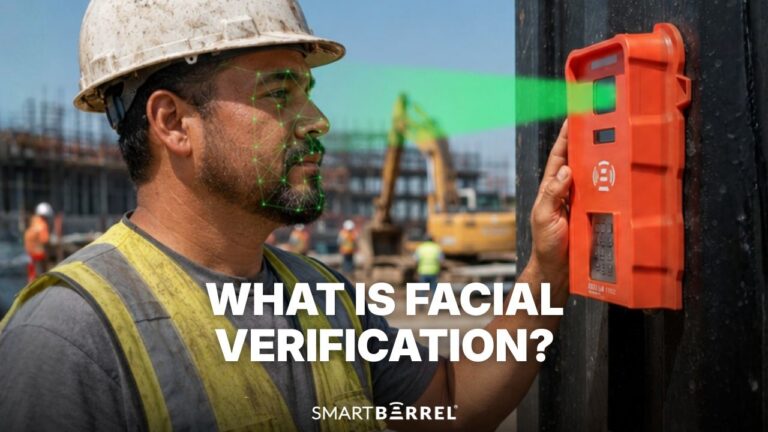
SmartBarrel’s integration with Foundation Software does just that. Workers clock in and out using biometric facial verification on the jobsite. Teams can use SmartBarrel’s rugged, weatherproof time clock device, or the mobile app. Foremen review the hours, and assign the correct cost codes. Verified hours and cost codes flow directly into Foundation’s pending timecards queue with no manual re-entry required.
What the SmartBarrel + Foundation Integration Does

The integration keeps SmartBarrel and Foundation in sync automatically. Foundation pushes current project data into SmartBarrel so field teams always have accurate information to work from. SmartBarrel pushes verified timesheets back to Foundation once foremen approve them.
Teams that want to visualize labor data beyond payroll can pull the same approved records into a reporting tool and watch hours against budget week to week.
What comes from Foundation into SmartBarrel:
- Employees: first name, last name, employee number, phone number, email address
- Active jobs: job number, job name, short name, street address, city, state, zip code
- Cost codes: code number, phase number, description. Where projects use phase-based cost codes, SmartBarrel combines the phase and cost code into a single reference so field teams have one clean selection when logging time.
What flows from SmartBarrel back to Foundation:
- Approved timesheets: employee, job, cost code, phase, date, hours, earnings type
- Entries land in Foundation’s pending timecards queue, ready for payroll review and processing
One capability worth noting: Foundation does not have a native sub-job concept. SmartBarrel works around that by letting administrators designate multiple Foundation jobs as sub-jobs under a single SmartBarrel project. Cost codes from each of those Foundation jobs pool together under one project view, which matches how many crews actually operate across a jobsite with multiple billing structures.
Administrators can trigger syncs on demand or set them to run on a schedule, so worker lists, active projects, and cost codes stay current without manual effort.
How It Works: Step by Step
- Connect SmartBarrel to Foundation using the integration settings inside SmartBarrel. Role-based permissions control who can configure the connection, trigger syncs, or export timesheets.
- Sync employees, active jobs, and cost codes from Foundation into SmartBarrel. The integration pulls active records automatically.
- Review the imported job list and activate the projects you want to track. Designate any sub-jobs at this stage by grouping additional Foundation jobs under a parent SmartBarrel project.
- Set up SmartBarrel. You can either deploy the TimeClock 4.0 at jobsite entrances, or download the SmartBarrel mobile app. Use Kiosk Mode to turn a foreman’s tablet into a shared check-in station. Or, use Punch Mode to enable time tracking on a worker’s personal smartphone.
- Workers clock in using the TimeClock 4.0 or the SmartBarrel mobile app. They enter their phone number and take a picture. AI Facial verification compares each picture to previous punches to confirm it is the same worker checking in. Once punched in or out, workers receive a text message confirmation with their exact punch time.
- Every punch gets created in Smartbarrel’s auto-populating timesheets for foremen to review and apply cost codes. Cost codes synced from Foundation are pre-populated and carry forward automatically. Foremen review hours, assign cost codes and can split time across multiple cost codes.
- Approved timesheets are synced to Foundation’s pending timecards queue on a schedule or on demand. Payroll teams see completed entries ready to process.
That is the full workflow from field to Foundation. Workers clock in without coordination from a foreman. Verified hours land in SmartBarrel with cost codes pre-populated from Foundation. Foremen review and approve in minutes rather than hours. Payroll teams see clean entries in the pending timecards queue instead of a correction backlog. For contractors already running Foundation, the integration removes the last manual step between the jobsite and payroll. Learn more about SmartBarrel Foundation integration.
Manual Entry vs. SmartBarrel + Foundation
Manual Entry into Foundation | SmartBarrel + Foundation | |
Time accuracy | Estimated or rounded | Verified to the minute |
Buddy punching | Undetectable | Eliminated with facial verification |
Foreman time on timesheets | 6-8 hours per week | 15-30 minutes per week |
Cost code accuracy | Often missing or incorrect | Synced from Foundation, confirmed before export |
Payroll queue population | Manual re-entry required | Automatic to pending timecards |
Sub-job tracking | Not natively supported in Foundation | Supported via SmartBarrel project grouping |
Real-time jobsite visibility | None until end of week | Live dashboard |
Implementation time | N/A | 2-3 days |

Frequently Asked Questions
How does SmartBarrel connect to Foundation Software?
SmartBarrel connects directly to Foundation through the integration settings inside the SmartBarrel platform. Once the connection is configured, worker records, active jobs, and cost codes sync from Foundation into SmartBarrel automatically. Approved timesheets flow back to Foundation’s pending timecards queue without any manual file exports or uploads.
What is the difference between facial verification and facial recognition?
Facial recognition identifies who someone is, the way law enforcement databases work. Facial verification confirms that the person clocking in matches their own previous photos. SmartBarrel uses facial verification. The system cannot identify strangers or tell you anything about a person beyond whether they match their own prior check-ins. Workers register themselves the first time they clock in. No photoshoot, no enrollment process.
How does sub-job tracking work with Foundation?
Foundation does not have a native sub-job concept, but SmartBarrel supports it. Administrators can designate multiple Foundation jobs as sub-jobs under a single SmartBarrel project. Cost codes from each of those Foundation jobs pool together under one project view, so foremen work from a single dashboard rather than switching between separate job records.
Can time be split across multiple cost codes or phases?
Yes. Foremen can split a worker’s time across different cost codes or phases directly in the SmartBarrel dashboard. When time is assigned to one code, the system calculates the remainder automatically. Each split exports to Foundation with the correct cost code and phase already applied.
What happens to timesheets after they export to Foundation?
Approved timesheets land in Foundation’s pending timecards queue. From there, your payroll team reviews and processes them through the normal Foundation workflow. Nothing changes on the Foundation side of the process.
Can syncing run automatically without manual triggers?
Yes. Administrators can set syncs to run on a schedule, keeping worker lists, active projects, and cost codes current without anyone manually initiating the connection. Timesheet exports can also run on a schedule so completed timesheets flow to Foundation regularly.