

Meal attestation is a worker’s recorded confirmation, usually captured at clock-out, that they were provided a compliant meal period and rest breaks during the shift, or that they chose to skip or shorten one on their own.
For California employers, an attestation can serve as supporting evidence when a missed break premium claim comes up, but it doesn’t establish compliance on its own. Its value depends on the employer actually providing compliant breaks and keeping an accurate time record underneath it.
This breakdown of meal attestation meaning, California rules, and jobsite examples applies to specialty contractors and self-perform general contractors tracking crews across multiple jobsites.
Meal Attestation Meaning: What Employees Confirm at Clock Out
In practice, meal attestation means two confirmations tied to a single shift: whether the employee was offered a compliant meal break, and whether any missed, late, or short break was the worker’s own decision.
Rest break attestation works the same way for the paid ten-minute break periods California requires, and most contractors run the two together as meal and rest break attestation. On a jobsite, the meal attestation meaning extends to one more question: whether the worker was free to leave the site during the meal period.
No state statute makes attestation itself a legal requirement. The requirement is to provide breaks and maintain accurate records of them. Under Brinker Restaurant Corp. v. Superior Court (2012), employers must relieve workers of all work duties and offer a real opportunity to break, without policing whether each worker eats.
A written break policy, plus training for foremen on not discouraging or interrupting breaks, supports that standard. The attestation records the worker’s own account of whether the break was offered, and the time record shows when the employee clocks out and back in.
What Is Timesheet Attestation?
Timesheet attestation is a worker’s confirmation that the hours recorded for a shift or pay period are accurate. Meal and rest break confirmations are usually part of it, so meal attestation is one piece of a broader timesheet sign-off. On many jobsites, the foreman signs the timesheet for the whole crew, which records an approval instead of each worker’s own attestation.
What Is the Meal Period Attestation in California?
The meal period attestation in California is a per-shift record in which the employee confirms whether they received each required meal period on time, or that any missed, late, or waived meal was their own choice. Under Labor Code Section 512, that means a 30-minute meal starting before the end of the fifth hour on shifts over five hours, and a second meal on shifts over 10 hours.
California Meal and Rest Break Rules at a Glance
California’s break laws are among the strictest state laws. The California Division of Labor Standards Enforcement meal period guidance covers the core rules:
Requirement | Rule | Waiver or exception |
First meal period | 30 minutes for any work period over five hours, starting by the end of the fifth hour | Meal break waiver by mutual consent of both the employer and employee if the shift is six hours or less |
Second meal break | 30 minutes for shifts over 10 hours | Waivable if total hours are 12 or less and the first meal was not waived |
Rest periods | Paid ten minute break for every four hours worked or major fraction thereof | Not required under 3.5 hours of daily work, per Brinker |
Missed break premium | One additional hour of pay at the regular rate per workday for missed meal breaks, plus a separate extra hour for missed rest breaks | Paid on top of hours worked |
Brinker spelled out the math: 10 minutes of rest for shifts of 3.5 to six hours and 20 minutes for shifts over six hours up to 10, so a 6.5-hour day typically earns two rest periods.
Why Do California Employers Need Break Attestation?
California employers need break attestation because the burden of proof shifts to them once time records show a problem. In Donohue v. AMN Services, the California Supreme Court held that records showing missed, short, or late meal periods create a rebuttable presumption of a violation, and that meal punches cannot be rounded. The employer can rebut that presumption with evidence, for example that the worker was paid the premium, or that a compliant meal period was provided and the worker chose not to take all of it.
For California businesses, missed breaks are a frequent basis for class action lawsuits because one policy applied across hundreds of workers turns a single-shift gap into company-wide exposure.
How Do Construction Meal Period Rules Differ From Other Industries?
Construction meal period rules differ in two ways: qualifying union agreements can exempt crews from the standard meal rules, and meal periods spent confined to the site can still count as paid time. Both apply to on-site construction work covered by Wage Order 16.
The Union Exemption Under Labor Code 512(e)
Labor Code Section 512(e) and (f) exempt construction workers from the standard meal period rules when a qualifying collective bargaining agreement covers them. To qualify, the agreement must:
- Expressly provide for meal periods, along with wages, hours, and working conditions
- Include final and binding arbitration of meal period disputes
- Pay premium rates for overtime and set a regular rate at least 30% above the state minimum wage
Contractors managing union and non-union crews on the same jobsite often run two break policies on one project.
Can Exempt Crews Still Be Owed Pay for Meal Periods?
Yes. A union exemption doesn’t remove the obligation to pay for meal time under the employer’s control. In Huerta v. CSI Electrical Contractors, a case involving workers on a California solar project, the court held that a meal period designated as unpaid under a qualifying agreement still counts as hours worked in one situation.
That happens when the employer prohibits workers from leaving the premises or a designated area in a way that blocks personal activities. A remote site layout, on its own, doesn’t establish that control.
For attestation, jobsite questions should capture whether the worker was free to leave, in addition to whether they ate.
What Makes Employee Attestation Hold Up in a Dispute?
A defensible employee attestation record has two parts: a verified punch showing who was on site and exactly when, and the worker’s own answer captured at clock out. If either part can be questioned, the other loses most of its value in a dispute.
Verified Presence and Location at Every Clock In
When a break record can be questioned on who punched or where, the attestation attached to it may be questioned too. Time clocks that confirm the worker was present at the jobsite for each punch give employers stronger support if that question comes up.
Meal Breaks Recorded to the Minute, Never Rounded
A 23-minute lunch rounded to 30 minutes hides a violation, and a worker can’t accurately confirm a break the system displays incorrectly. The Donohue court noted that end-of-pay-period certifications can’t prove compliance if the punches behind them were rounded and workers had no way to see the gaps. Automatic lunch deductions carry similar exposure, because the record shows a break whether or not one happened.
Questions That Prompt Employees About Real Jobsite Conditions
Jobsite questions should reflect continuous pours, shared crane picks, and gated sites:
When it triggers | Sample question |
Any work period over five hours | Were you offered an uninterrupted 30-minute meal break before the end of your fifth hour of work? |
Missed, late, or short meal punch | Did you voluntarily choose to work through or shorten your meal, or were you required to because of work duties? |
Every shift with a meal period | During your meal period, were you free to leave the jobsite or your designated area? |
Shifts over 10 hours | Were you offered a second meal break, or did you agree to waive it? |
Every shift | Were you offered your required breaks for rest? |
Questions can vary by project, which matters when union and non-union crews on different jobsites fall under different meal period rules. A timestamped, same-day answer about a specific shift is stronger evidence than one signature at the end of the pay period covering two weeks of work hours.
Why Is Crew-Level Break Tracking Hard to Defend?
Crew-level break tracking typically records the planned lunch for everyone, whether or not each worker got the required meal. These systems ask foremen to run production and certify break compliance at the same time, so crew-grid entries often get filled in at week’s end from memory and the schedule.
At Apache Industrial, manual sign-in left gaps, including missing lunch breaks, that drove weekly cleanup. After moving to verified timekeeping across 6,000 field employees, Kurtis Kim, VP of Information Technology, described the shift: “We’ve moved that data to the field and have supervisors and project managers responsible for their employees.”

See how verified punches support break compliance across every jobsite. Book a SmartBarrel demo.
What Does Compliant Meal Data Show Across Multiple Jobsites?
Across multiple jobsites, compliant meal data shows where schedules or site conditions, such as continuous pours or break areas far from the work face, are pushing breaks late or cutting them out.
Tracking premium pay by jobsite and reviewing it with real-time visibility lets operations leaders take corrective action the same week, which helps avoid penalties stacking up across a pay period. Consistent breaks also support employee productivity late in long shifts.

How SmartBarrel Supports Meal and Rest Breaks Records
Every attestation depends on the time record underneath it. SmartBarrel captures the verified punch and the worker’s answers in one record, with the goal of producing the most accurate time from the field.
The Verified Punch
Workers clock in and out on the TimeClock 4.0, the Kiosk App, or the SmartBarrel mobile app, and each part of the punch record is captured at that moment:
- Who was on site: Facial verification compares each check-in photo against the worker’s previous check-ins, with no photoshoot required, and flags anything that looks off for review.
- Where: Geofencing on the apps confirms each punch happened inside the jobsite boundary.
- When: Built-in LTE sends exact punch times to the Live Dashboard in real time, and workers get a text confirmation of each punch.
- What changed: The activity log records edits after foremen review hours, before data syncs to systems such as Procore, CMiC, and Viewpoint Vista.
Apache Industrial cited accurate capture of worker lunches as one of the results. Rounding and lunch rules in SmartBarrel’s construction time tracking software are configurable, so teams working under California-style labor laws can keep meal punches exact.
Break Attestation at Clock Out
SmartBarrel is adding an attestation module that brings break attestation into the clock out process for crews punching on the SmartBarrel mobile app. Each project will be able to set its own questions, using SmartBarrel’s default wording or custom text, with a standard set covering meal breaks, rest breaks, total hours worked, and incident reporting. Workers will answer yes or no, add details when needed, and can be required to acknowledge their answers and sign before the punch out completes.
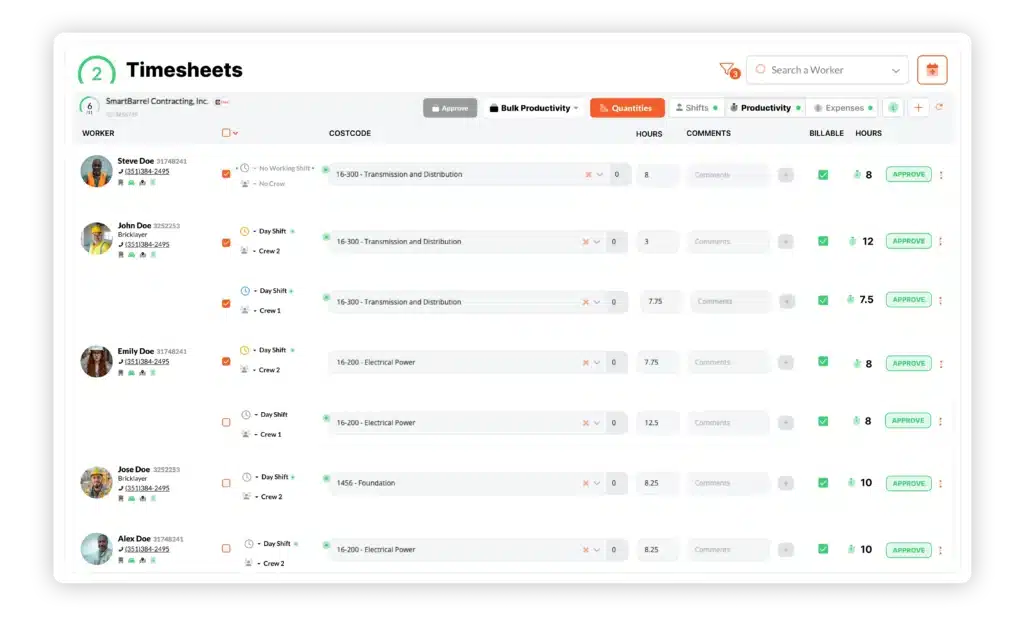
When a project requires attestation review, shifts with problematic answers are designed to show red on the timesheet and stay unapproved until a reviewer accepts or overrides the answers. Only flagged shifts will need review, so foremen can spend their time on exceptions rather than checking every crew grid.
The audit log will keep the original submission next to any override, and override reasons can be labeled justified, unjustified, or questionable. Clocking in stays simple for crews, while the dashboard handles multi-state, multi-jobsite operations.
See verified punches, break attestation at clock out, and review in one timesheet. Book a SmartBarrel demo.

Frequently Asked Questions
How long should contractors keep meal attestation records?
Contractors should keep meal and rest break records for at least the period California recordkeeping rules require, and longer if employment counsel advises it. Three years is a useful reference point, since Murphy v. Kenneth Cole Productions (2007) set a three-year limitations period for many meal and rest premium claims. That limitation period doesn’t by itself set a retention requirement for every underlying record.
What happens when a worker answers "no" to a break attestation question?
A “No” answer generally means the employer owes one hour of penalty pay at the regular rate for that workday, included in the same pay period so the worker is paid properly. The record should note the reason and any corrective action on scheduling. Disciplining a worker for an honest answer can create separate retaliation liability.
Can attestation answers be overridden or corrected, and is that a compliance risk?
Corrections are acceptable when a punch or answer was wrong, as long as the original entry, the change, the editor, and the reason stay visible. The risk comes from silent edits, especially ones that turn a “No” into a “Yes” without the worker’s confirmation. With an unaltered audit trail, a reviewer can tell a legitimate correction from a manipulated record.
Ready to stay compliant with verified time from every jobsite? Book your SmartBarrel demo.