
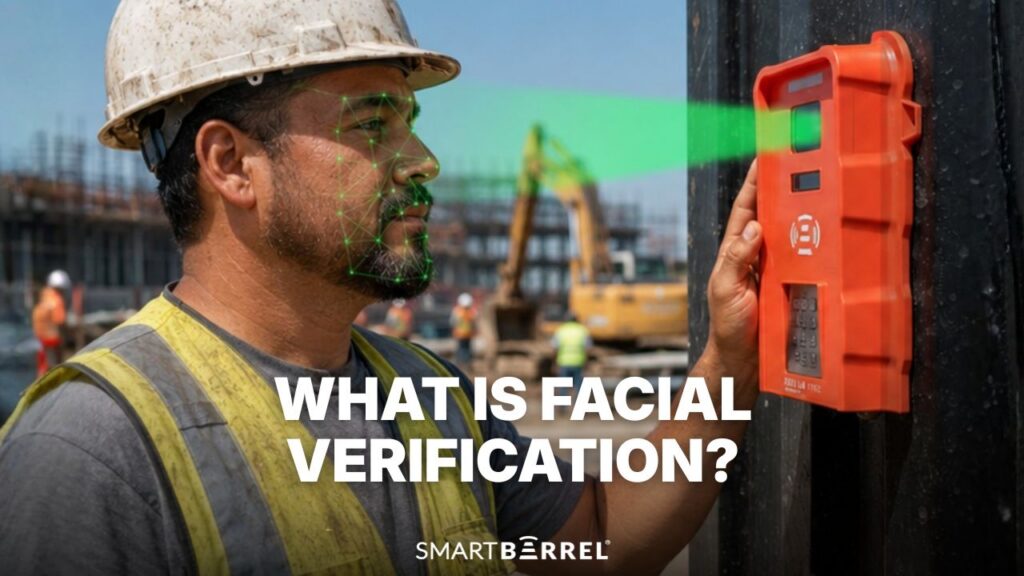
Facial verification is a one-to-one biometric check that confirms a person matches the record of one specific person already on file, rather than searching to work out who a stranger is. It answers one question: is this the same person who was here before?
Facial recognition asks something broader, comparing one face against many stored records to identify individuals. For specialty contractors and self-perform GCs tracking their own field crews, the gap between those two technologies decides what a system demands from the office before it works at all.
Face Verification vs Face Recognition: Two Technologies, Two Questions
The face verification vs recognition question comes down to this: When a worker punches in, facial verification compares that picture to all their previous punches to confirm it’s the same person. Facial recognition compares that picture to a database of images until it finds a match. Facial recognition technology will require a set of pictures to compare against created from photo uploads or even a photoshoot.
Comparison point | Facial recognition | Facial verification |
Question answered | Who is this person? | Does this match the record claimed? |
Face matching type | One to many | One to one |
What must be stored | A gallery of enrolled human faces | Prior captures tied to a single profile |
Faced with a stranger | Attempts a match, may return a wrong name | Returns nothing to compare against |
Common use | Surveillance, investigations, identification at scale | Time clocks, device unlock, ID document checks |
A verification system that has never seen someone produces nothing; a recognition system returns its closest candidate. How facial recognition works at that scale drives most privacy concerns, which is why facial recognition algorithms draw careful regulation in public spaces and why the two should not be used interchangeably.
Where Facial Recognition Technology Shows Up: Border Control, Law Enforcement, and Account Recovery
Facial recognition technology is built for accurate identification when nobody has claimed anything. Law enforcement agencies use one-to-many face identification to identify suspects and find missing persons. Border control and passport control blend both, matching travelers against the passport photo in their identity documents while screening watchlists.
Verification dominates wherever a person’s identity is already asserted. Financial institutions run remote identity verification at account creation, matching a selfie from a phone camera against a driver’s license or other government-issued ID.
That identity verification process now covers password resets and account recovery, where document verification replaces the physical documents once required. Contactless identity verification spread through government services for the same reason it works when opening a bank account: it cuts identity theft and identity fraud without adding a counter.
Construction borrows the technology and inherits none of that context.
The Three Questions a Camera Can Be Asked on a Jobsite
A camera can answer three distinct questions, and construction time tracking needs only the third.
- Identification. Who is this human face? That requires a database of everyone who might appear, and no contractor has one.
- Identity verification. Is this person legally the individual named on the record? That requires trusted identity documents, making it a hiring matter, not a clock-in matter.
- Presence verification. Is the person punching in on this profile the same person who has punched in on it every morning for six weeks?
Only the third question touches payroll. A T&M dispute never asks who someone was. It asks whether a named worker was physically present at a stated hour. That is a one-to-one question by nature, so the identification capability contractors worry about answers something nobody asked.


How Does Facial Verification Work? Face Detection, Feature Extraction, and Face Matching
Facial verification works in four steps, and the sequence typically runs in a second or two at the device.
- Face detection. The system separates a human face from hard hats, scaffolding, vehicles, and other objects in frame.
- Feature extraction. The system maps the geometry of the captured face, and advanced algorithms measure the unique facial features of that person’s face. Those unique features become a mathematical representation, a set of numbers rather than a browsable photo album.
- Face matching. That representation is compared against reference data held for the claimed profile, producing a similarity score.
- Decision. The score clears the threshold or it does not, and the result reaches the timesheet either way.
Artificial intelligence handles the middle two steps. What separates a field-ready system from a lab demo is step four, when the score sits near the line.
Why Does Enrollment Stall Most Construction Rollouts?
Enrollment, not accuracy, usually kills a biometric rollout on a jobsite. Systems built around a curated gallery need every worker photographed and uploaded before the first punch. With weekly turnover, temp labor, and hourly subs arriving mid-phase, that becomes a standing administrative job.
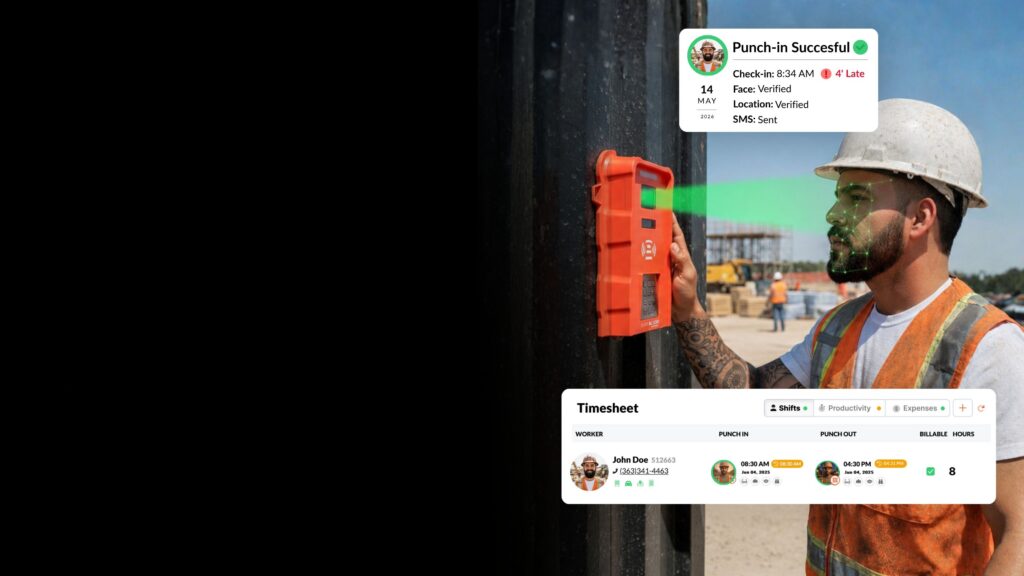
SmartBarrel builds the reference set from the work itself. A worker enters a phone number and payroll ID, the device captures a photo, and every later punch adds to that profile’s own record. There is no photoshoot and no gallery to maintain.
Because the comparison stays one-to-one, the system never needs to know anything about anyone it has not met, which is why it cannot identify a stranger who walks up to it. Apache Industrial runs this across roughly 6,000 field employees at 40-plus locations, with no enrollment queue standing in front of it.
See how verification works on your jobsite. Request a SmartBarrel demo.
Does Facial Authentication Work With Hard Hats, Safety Glasses, and Gloves?
Facial authentication holds up well against standard PPE, which is why many contractors leave fingerprint readers behind. Gloves, epoxy, concrete dust, and hands worn smooth by years in the trades all defeat a fingerprint sensor, and iris readers want a still subject at close range. A camera asks for neither.
Covering a face still makes it harder. The National Institute of Standards and Technology (NIST) found that the more of a face a mask hid, the more often software got it wrong: the best algorithms missed between 2.4 and 5 percent of the time on masked faces, against well under 1 percent on uncovered ones.
Hard hats and safety glasses sit above and around the features carrying the most matching signal, so they interfere far less than a mask over the nose and mouth. Sunglasses and full face coverings are the harder cases, and any honest vendor says so.
Is Face Verification Accurate on an Outdoor Jobsite?
Yes, though accuracy outdoors depends less on the algorithm than on how many reference captures the system holds. A profile built from one pristine onboarding photo must match a face in glare, rain, and low winter light against a single clean sample. A profile built from sixty prior punches at the same gate has an easier comparison to make.
Worth knowing how accuracy is measured before accepting any percentage claim. NIST evaluates verification through its ongoing one-to-one face verification testing program, reporting false non-match rate at a fixed false match rate. Two systems quoting the same headline number can behave differently once the threshold moves.

Liveness Detection and Anti-Spoofing Measures in the Field
Liveness detection confirms the person presenting is physically present rather than a photo held to the lens. Presentation attacks in construction are low-tech: a phone screen showing a coworker’s face, a printed badge photo.
Strong liveness detection matters more than raw match accuracy here, since a verified person standing at the device is the point of leaving fobs and codes behind. Ask any vendor what their anti-spoofing measures are and how they were tested.
Algorithmic Bias, Diverse Datasets, and Demographic Groups
Algorithmic bias is a documented issue here. Published testing has found error rates varying across demographic groups, driven largely by how narrowly training data was drawn. On a jobsite, that is a payroll problem for specific workers. Ask whether a vendor’s models were trained on diverse datasets, and treat a vague answer as an answer.
What Happens When Face Matching Does Not Clear?
A near-threshold result should flag for review rather than lock a worker out of their shift. SmartBarrel marks each punch green or red on the dashboard: green means the capture is consistent with the profile, red means something is off and a person should look.
The punch still records. Nobody stands at a gate at 6:00 a.m. arguing with a device. A system that hard-blocks on a failed comparison teaches crews to work around it, which is how paper timesheets come back.
What Do Verified Check-Ins Change for Payroll, T&M, and Access Control?
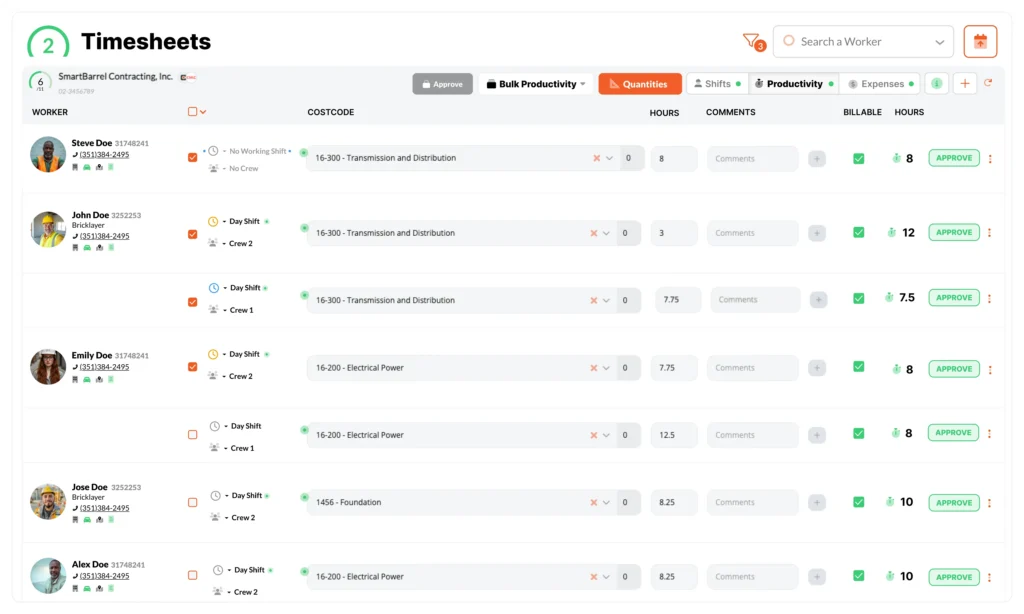
Biometric verification changes what a contractor can prove. Once every hour on a timesheet carries a check tied to a named profile at a stated time, payroll disputes stop being a negotiation over recollection. That is what the most accurate time from the field buys.
It also gives a California meal period attestation its weight, because the worker’s answer at clock-out sits on top of a punch that proves who was on site and when.
Newtron, a union electrical contractor with more than 1,000 employees, cut payroll processing time by 20 percent on data center projects with verified punches producing auditable, defensible hours. For contractors handling union payroll reporting or certified payroll, that audit trail is the deliverable, not a byproduct.
Fraud prevention is half of it. The same check handles access control. Wired to a turnstile or maglock, the device gates restricted areas and helps enhance security without a second credential system, because the check proving a worker was on the clock is the one proving they were allowed through.
Contractors running construction time tracking software tend to find access control arrives free, and the verified record is what makes it possible to prevent buddy punching on construction sites rather than discourage it.
Is Biometric Data Private? What to Ask Before Buying
Privacy depends on what a vendor retains and for how long. Biometric data also carries legal obligations that vary by state, and those answers belong with your counsel, not a blog post.
The Illinois Biometric Information Privacy Act is the strictest example, defining a scan of face geometry as a biometric identifier and requiring written notice, explicit consent, a retention schedule, and timely destruction. Texas and Washington have their own versions.
Four questions make the comparison concrete:
- What is retained, images or a mathematical representation?
- How long is it kept, and what triggers deletion?
- Who else can access it, and does it leave your existing systems?
- What consent language does the vendor supply?
Ask these before signing and you make informed decisions instead of learning the answer in an audit.
Privacy is one line on a longer buyer’s checklist for construction time tracking software, next to field connectivity, cost coding, and payroll integration.
Frequently Asked Questions
Is facial verification the same as a timestamped photo at clock-in?
No. A timestamped photo records who was there for someone to review later. Facial verification compares the captured face against prior captures automatically and flags anything inconsistent at the punch rather than in a payroll audit weeks later.
Can a worker clock in by holding up a photo of a coworker's face?
Not against a system with liveness detection, which tells a live face from a printed or on-screen image. This is the attack anti-spoofing measures exist to stop.
Do workers need a smartphone to use facial verification?
No. A jobsite device handles crews with no phones, and workers can self-register a fob. The Personal App turns a worker’s own phone into a mobile time clock, but it is an option, not a requirement.
What if a worker refuses to participate?
Consent requirements in states with biometric privacy laws mean refusal has to be handled, usually through an alternative punch method documented in policy. Work it out with counsel before rollout, not during it.
The Distinction Is Worth Getting Right
Facial verification and facial recognition are two technologies with different capabilities, data footprints, and legal weight. Construction time tracking needs the narrower one. Any vendor calling their product facial recognition is either using the wrong word or building something broader than a timesheet needs, which is worth a question in the demo.
Get the most accurate time from the field. Request a SmartBarrel demo and see verified check-ins on your own jobsite.