

A construction time tracking checklist only earns its place in a buying decision if it separates real capability from a features page. Most vendor comparisons list the same items: mobile app, GPS tracking, ERP sync. What separates great construction time tracking software from good enough? This checklist dives deep into what specific features and functionalities a true construction time tracking software must have before you sign the contract.
Who This Checklist Is For
This checklist is built for specialty contractors and self-perform general contractors tracking their own crews, not GCs coordinating subcontractor payroll. If a construction project involves managing multiple subcontractor companies rather than direct employees, temp labor, and hourly subs, the evaluation criteria shift.
The checklist assumes construction crews clocking in under one company’s supervision, managing labor costs across more than one jobsite. Construction companies fitting this profile see the most value from the key features below.
Is it Simple for Workers to Punch in?
Adopting new software is worthless if the people using it every day won’t actually use it. A jobsite is a mixed workforce spanning different ages, English and Spanish speakers, and different comfort levels with technology, and a system that only works for the tech-savvy half of the crew isn’t solving the problem.
- Clock-in requires no more than a phone number and a photo. No login to remember, no app download that stalls at a bad signal.
- The first punch is the training. If a worker needs a walkthrough to clock in, the system is already too complicated for a jobsite.
- Multiple ways to punch in — device, phone, or kiosk — so a lost phone or a dead battery isn’t an excuse for a missed punch.
- SMS confirmation after every clock-in gives workers the same record leadership sees, so hours live on their phone instead of in a notebook that can get lost or disputed later.
If a vendor can’t demo a worker punching in in under a minute with zero prior training, that’s worth testing before signing anything.
Does It Verify Identity, or Just Log a Punch?
A time tracking system that only records a punch time, without confirming who made it, still leaves buddy punching and ghost punches possible, showing up in inflated labor hours and disputed labor costs.
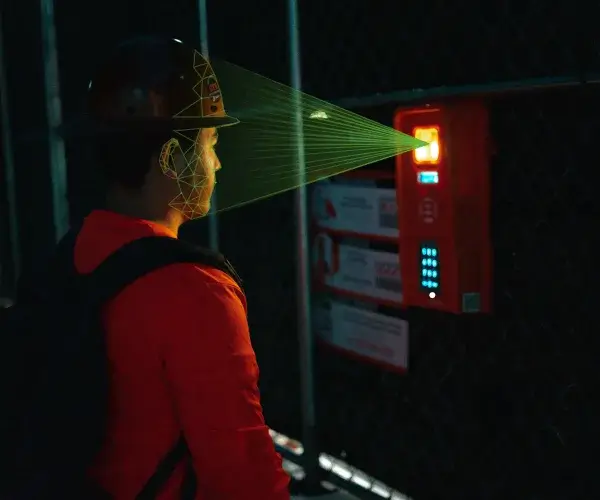
Photo capture and PIN entry log an event. Biometric facial verification confirms the person clocking in matches their own prior photos, a different guarantee than simple GPS tracking or a shared login.
That matters most with hourly subs, temp labor, and rotating crews, where a shared badge or borrowed phone can generate a paycheck for someone never on site, and time theft is easiest to miss until payroll closes.
For a closer look at how one-to-one matching works on a jobsite, see our explainer on what facial verification is and how it handles worker data.
When evaluating construction time tracking apps, a vendor should be able to answer these directly:
- Does identity confirmation happen at every clock in, on every device, or only on select hardware?
- Does facial verification apply consistently, or does the system fall back to a PIN?
- Is “accurate time tracking” true under all conditions, or only under specific ones?
If the answer to any of these is “only sometimes,” that’s a gap worth pricing into the decision.
The resistance almost never lasts past the first week. Guys think it's tracking where they are all day or storing some kind of surveillance file on them, and once they see it's just a photo match at clock-in, nothing else, that fear goes away fast. What actually wins them over is that it stops the arguments about who punched in for who. Foremen stop having to play detective.
Albert Bou Fadel, Founder & CEO, SmartBarrel
Can It Confirm Where the Clock-In Happened?
GPS location alone tells you a device was near the correct jobsite, not that the worker punched in from inside its boundaries, which is why geofencing and identity verification need to work together.
A geofenced time clock app should let a contractor draw a boundary around each site and block clock-in attempts from outside it. On SmartBarrel’s geofence time tracking software, that boundary can be set from 50 to 1,500 meters, with unlimited geofences across jobsites from one dashboard.
Does GPS location tracking stand alone, or is it paired with identity verification at the same moment? A geofence confirming a phone was on site confirms nothing about which worker was holding it. For construction teams running crews across three, ten, or fifty active sites at once, that pairing prevents off-site punches rather than flagging them after the fact.
Does It Work Where the Job Actually Happens?
A time tracking solution that depends on WiFi will fail on the sites where it matters most, since new construction and remote sites rarely have reliable signal. Time tracking tools built for the field should confirm the following:
- Built-in cellular connectivity, not a dependency on jobsite WiFi, so a construction time clock functions on day one, before internet has been run.
- Offline functionality, so if a device loses signal mid-shift, punches store locally and sync once connectivity returns, rather than requiring the manual data entry that drives most timesheet errors to reconstruct a lost shift.
- Reliable performance in real field conditions, since gloves, dust, and outdoor lighting affect whether a device can scan a fingerprint or read a badge. Fingerprint-based systems tend to fail under these conditions, forcing field teams back to manual time tracking as a workaround.


How Granular Is the Cost Coding?
If hours aren’t tied to a cost code and project phase at clock-in, job costing becomes a reconstruction exercise instead of a report, and project costs stay a guess until payroll closes.
Basic time tracking that logs a start and stop time for a shift, without breaking hours down by cost code, gives project managers a total but not an explanation.
Advanced job costing ties every clocked hour to a construction project and a cost code from the start, so a superintendent sees labor spent on rough-in, framing, or punch-list work separately, making it possible to control labor costs by phase instead of by guesswork.
Prism Electric, an electrical contractor with 2,000 employees across Texas and Oklahoma, listed constantly miscoded time among its biggest cost-coding problems before switching to clock-in-level verification. Once time was captured accurately at the source, the company reported eliminating that miscoded time almost immediately, rather than catching it weeks later in a payroll correction.
SmartBarrel’s construction productivity tracking software ties cost codes to verified shifts automatically, so a foreman assigns a project and cost code pairing at clock-in rather than a payroll admin reconstructing it days later from memory or paper timesheets.
Can a foreman assign a cost code once they review and the hours are accurate and the worker is verified, or does that happen days or weeks later, when memory is foggy? Accurate job costing depends on getting that sequence right at the source, not on better cost tracking after the fact.
The surprise is almost always how much labor was quietly bleeding into the wrong phase. A contractor will assume their punch-list work is a small line item, and once cost codes are captured at clock-in instead of guessed at later, they see it's actually eating hours they thought were going to rough-in. The total labor cost usually doesn't change much, it's the distribution across phases that catches people off guard.
Chris Magsambol, SmartBarrel
Does the Data Actually Reach Payroll and the ERP?
Integration depth is not the same as integration existing, and a system that only exports a spreadsheet for manual upload still leaves manual entry in the workflow. A shallow integration produces a report reformatted and re-keyed into Procore, CMiC, Foundation, or Viewpoint. A deep integration pushes verified hours, cost codes, and project data into those systems without retyping any of it.
When a punch is verified in the field, how many manual steps happen before that hour appears in the payroll run or the ERP? Zero is the answer that protects payroll accuracy at scale.
SmartBarrel’s integrations connect directly with Procore, CMiC, Foundation, Viewpoint, Plexxis, BuildOps and others so structured labor data reaches accounting software the same way it was captured, without a separate trip through project management software to reformat it first.
Harper Electric, an electrical contractor managing 140 employees across a main office and satellite locations, cut manual data entry by 70% after adopting verified time tracking. That reduction came from eliminating re-keying between field data and payroll processing, cutting the payroll errors manual entry used to introduce and supporting more accurate payroll.
Is It Built for One Jobsite or Fifty?
An app that works cleanly for one crew on one site can still fall apart at ten sites if setup or reporting doesn’t scale with headcount, and real-time visibility across construction operations is the first to break down. Tracking multiple jobsites without the chaos depends on self-registered fobs, letting construction and field crews register their own device without office staff creating profiles one at a time.
Western Partitions Interiors scaled jobsite accountability across 500 projects using verified clock-ins, a scale where manual oversight would be functionally impossible without a workforce mobile app built for that volume. What does onboarding fifty new workers across three new sites look like in practice, and how quickly can a project manager track project progress once those crews are live?
It's rarely one dramatic event. Usually it's a payroll admin who's now managing spreadsheets from eight different site supervisors, each one slightly different, and the ops leader realizes nobody can actually tell them how many people were on site last Tuesday without making phone calls. That's the moment they start looking. The pain point isn't hitting ten sites specifically, it's realizing the process that worked fine at two sites quietly stopped working somewhere around six or seven.
Yana Tcharnaia, CRO, SmartBarrel

Can It Hold Up in a Billing Dispute?
A timesheet signed by a foreman or a spreadsheet entry can be disputed because neither proves a specific worker was on site at a specific time, while a biometrically verified record does. For contractors running time and materials contracts, this carries real financial weight.
Apache Industrial, a specialty contractor managing verification across 6,000 field employees, addressed this gap; verified time records fed directly into their billing process, and payroll disputes became easier to resolve because documentation was unambiguous, according to their published case study.
Labor law compliance adds another layer here. The Fair Labor Standards Act requires accurate recordkeeping for non-exempt construction workers, and the U.S. Department of Labor’s own guidance for the construction industry makes clear that overtime obligations apply regardless of how a worker is classified on paper.
A system that can’t produce an audit-ready record risks a labor law finding, not just a billing dispute, and staying current with labor regulations across multiple states is another reason that record needs to hold up on its own.
A Quick Way to Score Vendors
Rate each vendor yes, partial, or no on each row before signing anything.
Checklist Item | What to Confirm |
Identity verification | Facial verification at every clock-in, not just select hardware |
Location verification | Geofencing paired with identity confirmation, not GPS alone |
Field readiness | Built-in LTE, offline functionality, works with gloves |
Cost coding | Codes assigned at clock-in, tied to project and phase |
Integration depth | Direct sync to ERP and payroll, zero manual re-entry |
Scale readiness | Self-registered fobs, fast onboarding across multiple sites |
Audit readiness | Verified records usable in T&M billing disputes |
Industry-wide, poor data quality is estimated to have cost the global construction industry $1.85 trillion in 2020, with roughly 14% of all rework tied to decisions made on bad data, according to a joint study by Autodesk and FMI. A construction time tracking checklist is, in effect, a data quality checklist, and data quality is what good workforce management is built on.
Ready to see how a fully integrated system compares to a manual process? Request a demo to walk through the checklist against a live system.
Frequently Asked Questions
Does construction time tracking software require dedicated hardware, or can it run on mobile only?
Both models exist, and the right choice depends on jobsite conditions more than crew size. Mobile-only works when every worker carries a smartphone and connectivity is reliable, but dedicated hardware with built-in cellular connectivity holds up better where phones get lost, batteries die, or devices get shared across a shift. Many contractors run hardware at fixed entry points and a mobile app for supervisors and mobile crews.
Does construction time tracking software help with union or prevailing wage projects?
Yes, when the system applies different overtime rules, classifications, and reporting formats by project. Prevailing wage and union jobsites often require certified payroll reports depending on accurate cost code and hour data captured at the source, including break tracking where state rules require documented rest.
How is construction time tracking software typically priced?
Pricing usually scales with worker count, jobsite count, and whether dedicated hardware is deployed, rather than a flat per-company fee. Vendors quoting a single number regardless of company size are worth double-checking, since costs at 50 workers on one jobsite look very different from 500 workers across a dozen. Ask for a quote based on actual headcount and site count rather than a published price list.
Questions about how a specific feature would work for your crews? Contact SmartBarrel to talk through your jobsite setup.