

Timesheet errors in construction occur for a variety of reasons including rounding, estimating, manual re-entry, but the root cause runs deeper than that.
Understanding the cause of timesheet errors starts by assessing how time tracking is set up from day one. When data is collected after the fact, without verification, across multiple steps, variance isn’t a risk. It’s a near-certainty.
Common Timesheet Errors and Why Manual Entry Fails
The most common timesheet errors in construction aren’t calculation errors. Unlike manual time tracking, effective time tracking software surfaces these issues at the source rather than letting them compound across every pay period.
The payoff of automated time tracking shows up furthest downstream, in bids and job costs built on hours nobody had to reconstruct.
Four root causes show up consistently across contractors of every size:
Root Cause | How It Happens | What It Costs You |
After-the-fact capture | Foremen reconstruct work hours from memory at end-of-day or end-of-week rather than recording them at the moment of work | Time entries drift from reality with every hour that passes between the work and the record |
Multi-step transcription | A single hour of labor travels from field to paper timesheets to spreadsheet to ERP, passing through multiple hands | Each handoff introduces a new opportunity for human error; digits change, names get misread, cost codes get misassigned |
No verification at point of entry | Paper timesheets are self-reported with no mechanism to confirm identity, presence, or accuracy in real time | Time theft goes undetected, discrepancies compound, and by the time errors surface, payroll has been run |
Multi-site complexity | Workers move between sites, temp labor turns over, and cost codes shift mid-project across three or more active jobsites | Manual processes weren’t built for that complexity; errors don’t just happen, they multiply across every site and every pay period |
Travel time pay is one more line item that gets lost in that multiplication, since crews crossing jobsite boundaries mid-shift rarely get a clean record of when the drive started and stopped.
SmartBarrel addresses all four by design. Workers verify their own check-in and check-out using AI biometric facial verification directly at the jobsite.
That data flows automatically into your payroll and ERP systems without manual re-entry, across every site, in real time. Payroll, job costing, and compliance all pull from the same source record instead of a reconstructed one.
What Inaccurate Time Tracking Costs Construction Projects
Inaccurate time tracking affects project costs in ways that are rarely visible until the damage is already done. The most direct impact is payroll variance.
Paper Timesheets Create Payroll Calculation Errors
Research cited by the American Payroll Association indicates that organizations relying on paper timesheets can see calculation errors as high as 8% of total payroll. For a contractor with 300 field workers, those payroll errors aren’t a rounding issue. They’re a material cost.
Beyond direct payroll impact, inaccurate hours corrupt job costing. Without reliable time tracking software, project managers are making decisions about resource allocation and project timelines based on data that doesn’t reflect reality.
By the time the discrepancy surfaces, it’s typically too late to course-correct without a financial hit.
Prevailing Wage Documentation Errors Lead to Back-Pay Claims
Labor law violations are another exposure point, particularly for union contractors and those working under prevailing wage requirements, where inaccurate work hours documentation can trigger audits and back-pay claims.
Time Theft and Billing Disputes Compound Cost Variance
Time theft is another driver of cost variance that paper timesheets can’t catch. T&M billing compounds this: clients are increasingly requiring verified documentation, and contractors relying on unverified records frequently lose disputes they should win.
DSI, a nationwide union contractor with 2,500 employees, identified $2.6M per year in potential savings from overreported and inaccurate time after switching to verified time capture. That figure wasn’t visible before because there was no mechanism to surface it.
For most contractors, the same exposure exists. It just hasn’t been measured yet. See what field-verified time data looks like for an operation like yours. Request a Demo.
How to Log Time Accurately: Where Errors Actually Enter
Most conversations about how to reduce timesheet errors focus on the back end: better review processes, more approval steps, tighter payroll controls. That’s treating the symptom. Errors typically enter at the very beginning of the data chain, and that’s where the fix needs to start.
Follow a single hour of labor through a typical process. A worker arrives on site. No one records the exact time. At the end of the shift, the foreman estimates arrival and departure for the crew, all reconstructed by memory after a long day’s work.
Those estimates go on paper. Someone in the office reads the paper and enters those hours into a spreadsheet. The spreadsheet feeds payroll. At no point in that chain is the original hour data verified. By the time it reaches payroll, it’s been interpreted at least twice.
When workers are asked to submit timesheets manually, or when foremen reconstruct hours after the fact, the back office and project management team are never quite on the same page.
Self-reported systems create a persistent gap between recorded time and actual time, and that gap typically widens as crew size and site count grow.
The fix isn’t more oversight at the end of the chain. It’s changing where data enters. When time is captured at the moment of work through worker-initiated check-in, data is accurate at the source.
The Foreman Problem: Why Common Timesheet Issues Aren’t a People Issue
Foremen aren’t the source of common timesheet issues. They’re being asked to do two jobs simultaneously with tools designed for neither.
In most manual setups, the foreman is responsible for managing their crew, dealing with absenteeism and materials, all while tracking time for all workers. Those two roles are in direct conflict. Insufficient training on time tracking software compounds this: when team leads aren’t confident in the tools, they default to whatever feels fastest, which usually means estimates.
According to Autodesk’s construction industry data, 20% of construction professionals report spending 10 to 15 hours weekly looking for data they need to do their jobs. Some of that time falls on team leads chasing timesheet records that tracking software should have captured automatically.
Decreased productivity isn’t just a field problem. Back-office staff absorb significant administrative burden correcting errors that originated on the jobsite. Ongoing training on manual time tracking software helps, but it doesn’t solve the underlying system design issue.
The goal is to take timekeeping off the foreman’s plate so they can do what they were actually hired to do.
How to Minimize Timesheet Errors: From Manual Input to Automatic Time Capture
Minimizing timesheet errors means addressing time tracking system design, not coaching better behavior. Here’s what that looks like in practice with the right time tracking software:
Capture Work Hours at the Moment of Work
The most reliable time tracking data comes from the point of entry to the site, not from an estimate hours later. Time tracking software that records check-in and check-out without manual input from supervisors closes the gap between what happened and what gets recorded. Workers submit digital timesheets automatically by clocking in and out, eliminating the reconstruction problem entirely.
Remove Rekeying Steps
Every data point that moves between formats risks an error. Direct integration between time capture and payroll or ERP systems, like the connections SmartBarrel maintains with Procore, Vista, CMiC, and Foundation, means data flows without being re-entered.
That’s how you minimize timesheet errors at the system level without relying on manual time tracking at any stage.
Build Buddy Punching Prevention Into the Process
Buddy punching is a direct form of time theft that’s invisible in paper-based systems. Workers who commit time theft by clocking in for absent colleagues leave no trace.
Biometric facial verification at the point of entry solves this. When identity is confirmed on every punch, workers simply can’t commit time theft for someone else. If there are discrepancies in a worker’s picture, foremen are immediately notified and can address it. Automatic time capture also creates an audit trail for every shift.
Use Digital Timesheets Team Leads Can Approve, Not Create
Pre-populated digital timesheets that supervisors review rather than build dramatically cut the administrative burden and help reduce timesheet errors introduced during approvals.
Foremen at LPL Solar went from building timesheets manually to approving accurate, pre-populated records in under five minutes per crew. That’s how you track hours worked without making foremen the bottleneck.
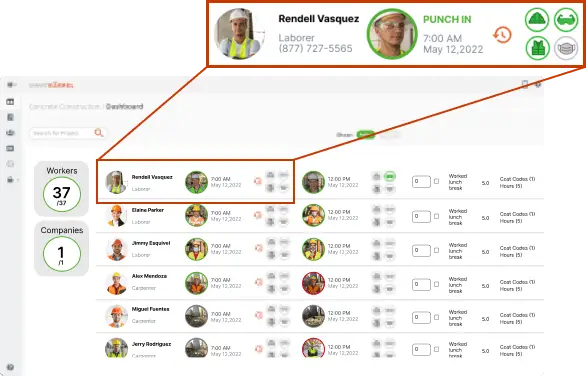
The underlying principle: when construction time tracking software captures employee hours at the source you are guaranteed 100% accuracy which eliminates manual errors and the administrative burden of rekeying hours across multiple systems.
Best Practices for Accurate Time Tracking and Verifying Crew Hours
The most reliable verification of hours worked happens at check-in, not at payroll review. A hardware-enforced approach addresses time theft and the most common timesheet errors before they can enter the system.
A few practices that hold up at scale:
Use Biometric Identity Confirmation at the Point of Entry
A biometric time clock on the jobsite or a mobile app with geofencing capabilities confirms that the person checking in is who they claim to be, without uploaded photos, or supervisor involvement. Workers check in by taking a picture. The time tracking software verifies identity against prior check-ins. No photoshoot required. Time theft is impossible.
Pairing that check-in with a geofence time clock means the punch also has to happen inside the jobsite boundary, so the location on the timesheet no longer depends on anyone’s memory.
Establish Real-Time Visibility Across All Active Sites
Reviewing digital timesheets in real time is significantly easier than reconciling records after a shift has closed. Real-time dashboards give supervisors visibility into employee hours as they accumulate, so common timesheet discrepancies surface while there’s still time to address them.
Integrate Time Tracking Processes Directly Into Your ERP
Direct integration via Procore or ERP platforms means accurate payroll records reflect what the field captured, not what someone interpreted from a spreadsheet or handwritten timecards. That integration eliminates a full category of errors from your tracking systems and supports consistent payroll accuracy every pay period.
The results of better time tracking are measurable, and they show what it looks like to reduce timesheet errors at scale.
WPI faced an estimated 10 to 15% error rate in timesheet entries before implementing automated time tracking. After rollout, that rate dropped to near zero and payroll approval time was cut from five hours to two.
What Accurate Time Tracking and Digital Timesheets Actually Unlock
When timesheet errors are addressed at the data collection layer, the improvements don’t stay in payroll. They spread across the entire operation.
Job costing becomes reliable. Cost codes assigned during clock-in carry accurate work hours into the ERP, giving project managers a real picture of labor spend by phase and trade.
On CMiC, that same hand-off runs automatically, with the CMiC integration syncing coded hours straight into eTime.
That supports better resource allocation, tighter bids, and more defensible change order documentation, making project management reporting reliable from the field to the front office. That kind of field accuracy is what makes project management decisions trustworthy at the executive level.
T&M billing disputes shift in your favor. Facially verified check-in records are significantly harder to contest than paper timesheets. Contractors billing on T&M can produce timestamped, identity-confirmed documentation for every hour billed, making accurate payroll and billing defensible in any dispute.
Payroll cycles get faster and cleaner.
Harper Electric moved from finishing payroll on Wednesday morning, sometimes with errors, to having it wrapped up error-free by Tuesday afternoon after implementing time tracking software. Crews that get paid accurately and on time trust the process, and that directly affects morale and retention.
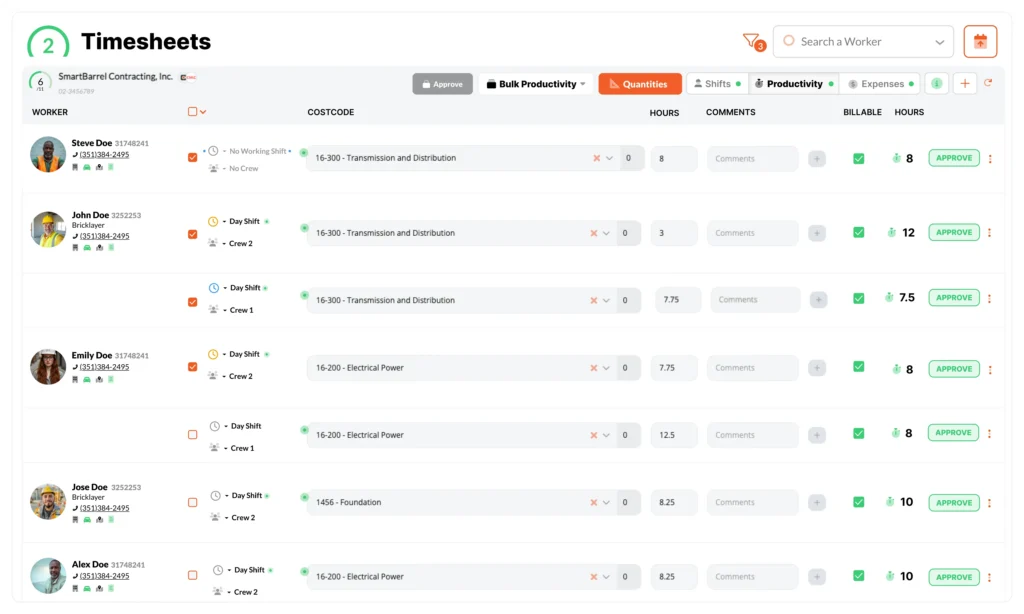
The pattern is consistent: time tracking software that captures data at the source reduces administrative burden, speeds up the entire time tracking processes, and produces reliable time tracking data that gives the business accurate data to make the business decisions with.
Frequently Asked Questions
Can Timesheet Errors Affect T&M Billing and Client Disputes?
Yes, and this is often where the financial impact is most visible. When billed hours can’t be supported with verified documentation, clients can dispute them successfully.
Contractors relying on paper timesheets or foreman-reconstructed records frequently lose disputes because their documentation doesn’t conclusively confirm who was on site and when. Verified, timestamped check-in records give contractors defensible backup that’s difficult to contest.
How Long Does It Take to See Results After Switching From Manual to Automated Time Tracking?
Results tend to surface within the first few pay periods. Most contractors see measurable improvements in time tracking accuracy within the first payroll cycle. Payroll teams typically notice the reduction in payroll errors and back-office time immediately.
Broader financial outcomes, like identifying overreported employee hours or improving job cost accuracy, become visible within the first one to two months, once there’s enough time tracking data to compare against prior periods.
Do Union Contractors Face Different Timesheet Error Risks Than Non-Union Contractors?
Union contractors face a specific version of this problem. Because union agreements lock in pay structures around set schedules, the concern isn’t always about per-minute accuracy. It’s about presence verification. Union contractors need to confirm workers were on site during the hours being paid, and that late arrivals or departures are documented accurately. Manual time tracking struggles here.
DSI, a nationwide union contractor, identified this as a core driver of their decision to implement a verified time tracking software solution across more than 50 projects, transforming their time tracking process at scale.
What Is the Difference Between Facial Verification and Facial Recognition?
Facial recognition compares a picture to a database of existing pictures to answer “who is this?” It’s the approach used in surveillance and law enforcement.
Facial verification compares each punch to that worker’s previous punches and continually self-learns how the worker looks over time. The system confirms “is this the same person who punched in last week?” rather than matching against a database of strangers.
For contractors, that means workers are captured accurately as their appearance changes over a project. Beards grow in, tans deepen, safety glasses come on and off. The system adapts to each worker individually. No day-one photoshoot required, the first few punches establish the baseline.
The Fix Starts Earlier Than Most Contractors Think
The contractors who’ve made the most progress on minimizing timesheet errors didn’t start with better approval processes or stricter review policies. They started by changing where data enters the time tracking system. When workers self-verify at the point of work, the starting dataset is accurate. Accurate payroll, job costing, T&M billing, and ERP reporting all inherit that accuracy. Digital timesheets that begin with verified field data don’t need correction later.
That’s the shift: from chasing common timesheet problems to preventing them at the source.
See how contractors like DSI and Harper Electric reduced timesheet errors at the source. Talk to Our Team.