
The best AI prompts for construction have four things in common: a defined role, real project details, a stated constraint, and a required output format. Strip any one out, and a generative AI tool returns something that reads well and says nothing.
Most prompt lists aimed at the construction industry are written for residential remodelers. The 10 below are for the construction PM, superintendent, or VP of Operations at a specialty contractor running crews across commercial jobsites.
What makes an AI prompt work on a construction project?
An AI prompt works when it carries four inputs: the role the tool should play, the real project data, a constraint, and the output format you want back. Put another way, give the AI tool the context you would give a new project engineer.
The Four Inputs | Weak prompt | Strong prompt |
Role, data, constraint, format | “Write a daily report for my project.” | “Act as a superintendent on a mid-rise commercial project. Write a professional daily site report from these notes: 14 workers on site, concrete pour on levels 3 and 4, rain from 2 PM stopped work. Format as manpower, work completed, material deliveries, weather conditions, open issues.” |
The difference is whether the prompt carries project details the tool cannot guess. Anyone comparing AI tools for construction will find the tool matters far less than what gets typed into it.
10 AI prompts every construction team can use this week
These are organized by seat, because a foreman and a CFO need different things from the same tool. Furthermore, the first step has nothing to do with tools or prompting at all. It’s ensuring you are working with the most accurate, up-to-date data. For operations leaders, that’s leveraging accurate hours and cost codes from a tool like SmartBarrel.
AI prompts for field leadership
1. Weekly crew productivity review
“Act as a construction PM reviewing field performance. Here are last week’s hours by cost code for [project name], with completed tasks and crew sizes per day. Identify cost codes that ran over plan, calculate the variance, and list three questions to ask the foreman before Monday”.
Produces: a variance summary you can walk into a Monday meeting with.
Needs: hours coded to the correct cost codes as they were worked, not reassigned from memory later.
2. Daily notes into a professional daily site report
“Turn these field notes into a professional daily site report for [project name] at [jobsite address]. Include manpower count, work completed, material deliveries, weather conditions, delays, and open issues. Under 250 words, plain language.”
Produces: a client-ready report from a superintendent’s phone notes.
Needs: an accurate headcount. A report claiming 22 workers on site when 18 were present is a liability in a dispute, so pull it from a construction daily log system rather than recollection.
3. Safety toolbox talks from a real incident
“Write a 5-minute toolbox talk for a crew doing [task]. Base it on this near-miss report: [paste de-identified description]. Cover what happened, why, and three actionable steps the crew takes tomorrow. 8th grade reading level, with examples from this trade”.
Produces: specific safety toolbox talks instead of generic ones nobody listens to.
Needs: incident detail with names and medical information removed.
AI prompts for construction project management
These AI prompts for construction project management cover the documentation a PM produces weekly, where a vague first draft costs billable hours.
4. Labor cost variance and change order justification
“Act as a construction project manager. Here is budgeted vs. actual labor hours by cost code for [project name] through [project phase]. Explain the three largest variances and their potential implications for the remaining budget. Then draft a change order justification for [scope change], showing labor impact in hours and why the work falls outside original scope”.
Produces: the analysis layer between raw hours and a leadership conversation, plus the change order narrative that follows.
Needs: clean historical data. This is the prompt that fails most often, for reasons covered below.
5. T&M billing narrative
“Draft a billing narrative for this T&M ticket. Crew and hours: [paste]. Work performed: [paste]. Write it so a reviewer can trace every hour billed to work described. Neutral tone, no adjectives”.
Produces: backup that survives review.
Needs: verified hours. A narrative built on rounded time reads fine and defends nothing. Prism Electric had thousands of weekly timesheets that looked identical, with time routinely rounded. Their move from rounded timecards to decision-grade field data is what makes this prompt work.
6. Drafting RFIs
“Draft an RFI asking the structural engineer to clarify a conflict between the drawings and field conditions at structural steel beam placement on grid line [X]. Reference drawing [number], describe the condition, state the schedule impact, request a response by [date]. Under 150 words”.
Produces: a clean RFI in two minutes instead of twenty.
Needs: nothing from your systems, which is why drafting RFIs is usually the first place teams see AI save time.
7. Look-ahead schedule and crew loading
“Act as a project scheduler. Here are the critical path activities and key milestones for [project name] over the next three weeks, plus current crew sizes. Build a three week look-ahead showing which trades are needed each week. Flag any week where crew size puts a milestone at risk, and recommend a resource allocation across my [number] available workers”.
Produces: a look-ahead you can mark up in a coordination meeting.
Needs: current, accurate headcount. A schedule built on the crew you think you have is built on a guess.
AI prompts for payroll and back office
8. Payroll exception triage
“Review this timesheet export for [pay period]. Flag missing punches, hours above [threshold], overlapping cost codes, or classification inconsistencies. Return a table sorted by priority with worker ID, issue, and suggested check”.
Produces: a triage list before the payroll run, not a correction cycle after it.
Needs: a structured export. This reduces errors only when exceptions are genuine.
9. Compliance question framing
“Act as a payroll compliance analyst. Here is our worker classification and hour breakdown for a project in [state]. List the questions to ask our labor attorney about ensuring compliance with prevailing wage requirements. No legal conclusions”.
Produces: a sharper conversation with counsel.
Needs: nothing sensitive. Strip names and wage rates before pasting.
AI prompts for operations leadership
10. Cross-jobsite labor trend analysis
“Act as a VP of Operations. Here is labor hour and cost data across [number] active projects last quarter, by project type. Identify trends in labor efficiency, name the two projects needing attention, and summarize the key points in five bullets for decision makers”.
Produces: an executive summary that supports decision-making rather than describing the past.
Needs: consistent data across every project. Sites tracking time differently produce a meaningless comparison.
Which prompts work today and which depend on your data
# | Prompt | Runs today | Field data required |
1 | Crew productivity review | Only with clean data | Cost-coded hours, assigned at time of work |
2 | Professional daily site report | Only with clean data | Verified daily headcount |
3 | Safety toolbox talks | Yes | De-identified incident notes |
4 | Labor variance and change order | Only with clean data | Budget vs. actual by cost code |
5 | T&M billing narrative | Only with clean data | Verified hours tied to work performed |
6 | Drafting RFIs | Yes | Drawing reference, field observation |
7 | Look-ahead schedule and crew loading | Only with clean data | Current headcount, milestone dates |
8 | Payroll exception triage | Only with clean data | Structured timesheet export |
9 | Compliance question framing | Yes | Classification summary, no wages |
10 | Cross-jobsite labor trends | Only with clean data | Consistent data across all sites |
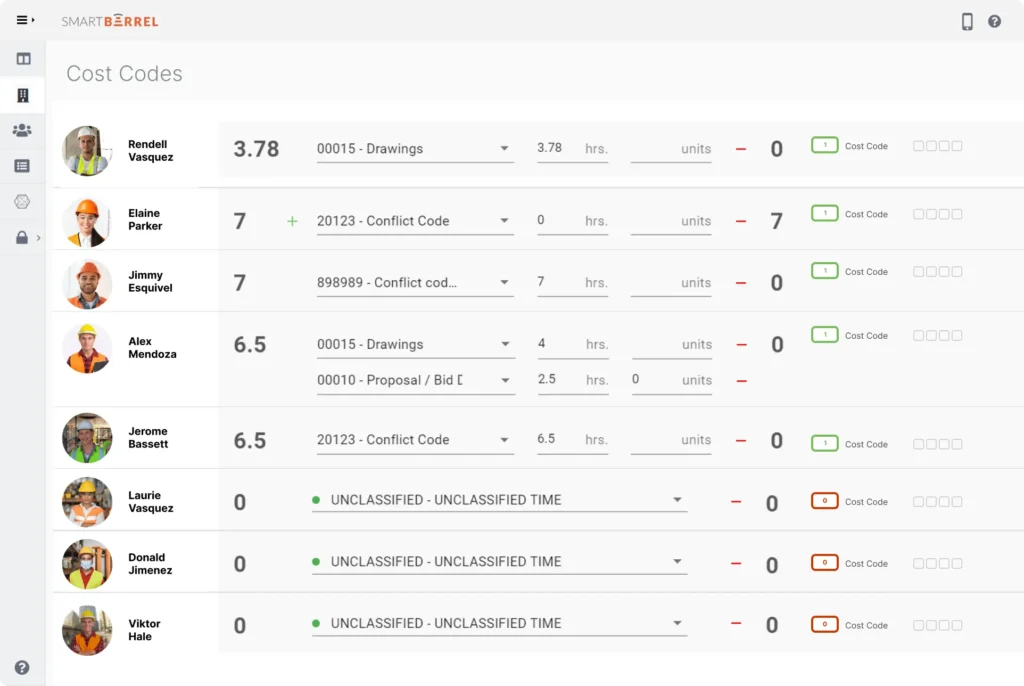
Seven of these ten prompts run on cost-coded, verified hours. See what that data looks like coming off your own jobsites.

What should you never paste into a generative AI tool?
Never paste worker names, wage rates, injury detail, or client contract language into a public AI tool. Decide what leaves your systems before running these AI prompts for construction on live project data.
Keep out of public tools:
- Worker names, employee IDs, Social Security numbers
- Wage rates and union agreement terms
- Injury reports containing medical detail
- Client contract language, unexecuted change order pricing
- Anything under active dispute or legal review
De-identification takes seconds:
- Replace names with “Worker A” and “Worker B”
- Replace the project name with a placeholder
- Strip the jobsite address
The analysis works the same, because the AI reads patterns in hours and cost codes rather than recognizing people. Enterprise subscriptions typically offer data retention controls consumer versions do not, so have IT confirm your tier before standardizing.
How do you get field data ready for AI prompts?
Field data becomes AI-ready when it is captured at the source, verified at entry, coded at the point of work, reviewed and approved on the same day:
- Capture at the source. Time recorded when a worker arrives carries a timestamp. Time recorded Friday from memory carries a guess.
- Verify presence at entry. Facial verification at check-in confirms the person clocking in is the person scheduled, closing the buddy punching gap that corrupts every number built on it.
- Assign cost codes at the point of work. Codes applied later distribute evenly across categories, exactly the pattern that makes prompt 4 return a smooth, useless variance report.
- Export in a structure your tools can read. Hours flowing into your ERP and BI stack without manual re-entry stay consistent enough to compare across projects, which prompt 10 depends on.
Contractors who tighten these four find construction productivity tracking becomes possible before AI enters the picture. The prompts then work on data that already reflects reality.
Frequently asked questions
Do these AI prompts work in ChatGPT, Claude, and Microsoft Copilot?
Yes, all 10 work across the major generative AI tools with no changes. Output style varies, so test one prompt in each and pick the tool whose tone your team prefers.
Can AI tools read timesheets, daily logs, or reports uploaded as files?
Most current AI tools accept PDF, Excel, and CSV uploads, which works well for timesheet exports and daily reports. Scanned paper produces less reliable results because the tool must interpret handwriting first. A clean export from your time tracking system is most accurate.
How long should an AI prompt be to get a useful answer?
Long enough to include the role, the real data, the constraint, and the output format, usually three to eight sentences. Short prompts return generic content, and very long prompts bury the request. If an answer misses, add the missing context rather than rewriting.
Book a demo to see how verified field data feeds your reporting and AI tools.