

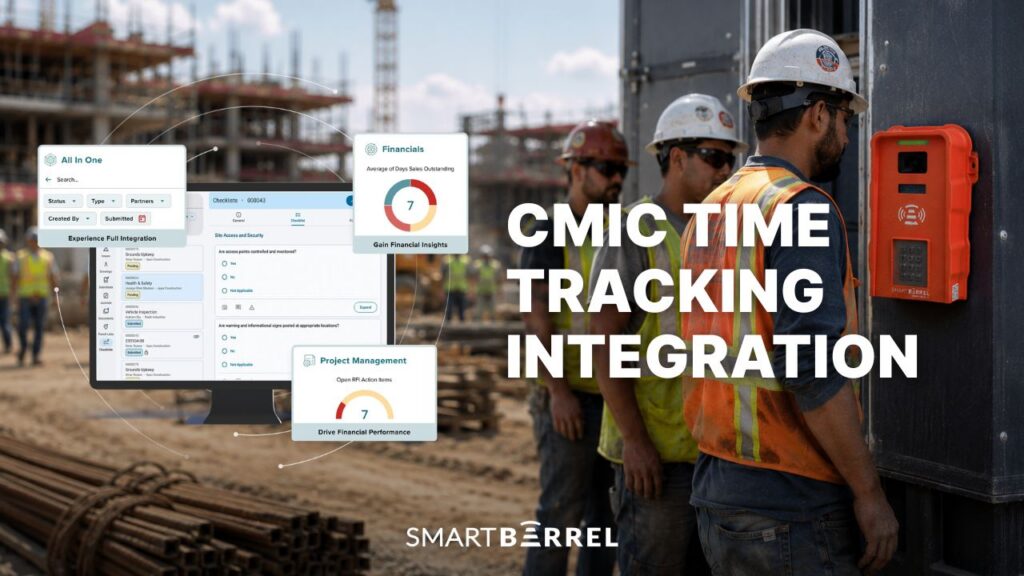
CMiC is a strong construction ERP: accounting, job costing, project management, payroll and more, relied upon by thousands of contractors.
One area that can complement CMiC is accurate time capture and cost code tracking, prior to data entering CMiC. Some contractors track time and cost codes with foreman time-entry solutions or manually on spreadsheets or paper. Sometimes, those entries are reconstructed by memory and miscoded, creating payroll and job cost errors.
Industry research suggests the scale is not small. A widely cited EY analysis found the average company runs at roughly 80 percent payroll accuracy and makes about 15 corrections per pay period, with missing or incorrect time punches alone costing an estimated $78,700 per 1,000 employees each year. For a contractor running labor across multiple construction projects, that variance compounds quickly into payroll reruns and cost overruns.
SmartBarrel sits in front of CMiC capturing labor hours at the source, then sends approved coded time into E-Time. The outcome is what every payroll team wants: accurate hours and costs codes that feed accurate payroll for workers.
The result? Less errors, no more chasing down field leaders, no manual entry, fewer payroll reruns, and job costing leadership can trust.
The SmartBarrel & CMiC Integration: How Does It Work?
The SmartBarrel and CMiC integration is a two-way data exchange. It pulls the records you have already built in CMiC out to the field, then returns verified time into CMiC’s E-Time with no spreadsheet handoff, or extra exports needed.


From CMiC to SmartBarrel
- Active employees, jobs, sub-jobs, and cost codes sync directly from CMiC into SmartBarrel.
- Codes can be filtered by cost type, so only labor categories (for example, “L” and “TL”) import and field crews see a clean, relevant list instead of the full chart, reducing the potential for errors.
From SmartBarrel to CMiC
- Approved timesheets flow back to CMiC E-Time with the full record attached: employee, job, sub-job, cost code, phase, date, hours, and earnings type.
- Entries land in E-Time for payroll teams to review and process, removing the manual re-entry that usually sits between time capture and a payroll run.
CMiC supports sub-jobs natively, and SmartBarrel pulls them through so workers can assign labor to the correct sub-job and code as they clock in, rather than during cleanup at month end. Because the codes arrive from CMiC instead of being typed on the jobsite, the labor data that reaches job costing matches the budget.
The same verified records can feed business intelligence tools alongside CMiC, so finance and operations read from one set of hours.
Field leaders gain real-time visibility as well. SmartBarrel gives you a live dashboard that displays all projects, worker counts and who is currently onsite.
The thing contractors tell me is that they used to treat cleanup as part of the job. Someone in the office spent the back half of every week chasing down which cost code a crew actually worked against, or which sub-job a worker was on Tuesday. Once CMiC and SmartBarrel are connected, the codes come straight from their ERP and the worker picks from that list when they clock in. So the data is right when it lands, not three days and four phone calls later. People expect the hours to be accurate. What surprises them is that the coding is accurate too.
Chris Magsambol, Director of Digital Marketing, SmartBarrel
How the CMiC Integration Works, Step by Step
Standing up the connection is simple and easy process
- Connect SmartBarrel to CMiC in the settings using your endpoint URL, an E-Time group access code with admin privileges, and a username and password with API service privileges enabled.
- Map your CMiC company codes to the SmartBarrel contractors you want to pull workers and projects from.
- Sync active employees, jobs, sub-jobs, and codes from CMiC. Filter by category if you only want labor types in the field list.
- Review the imported job list and activate the projects you want to track.
- Deploy SmartBarrel. Both the TimeClock 4.0 and mobile app can be up and running in minutes. The TimeClock 4.0 is battery or solar powered and easily mounted magnetically. The mobile app works on both tablets or smartphones.
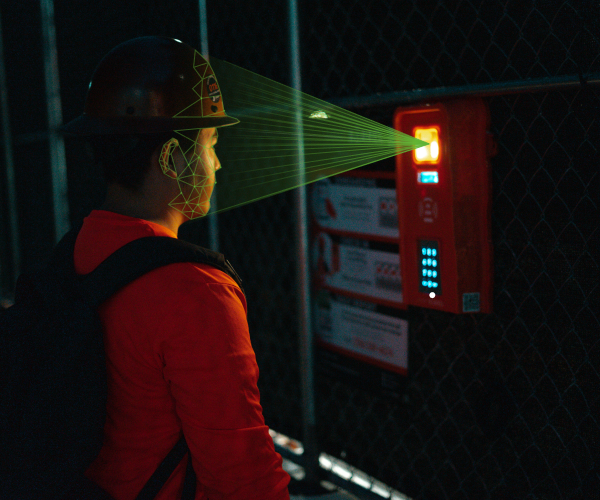
- Workers clock in the exact same way on the TimeClock 4.0 and mobile app: they enter their phone number and take a picture. AI Facial verification compares punches to previous punches ensuring it’s the right person clocking in each time.
- Foremen review self-populating timesheets in the dashboard, select the right cost code from CMiC’s pre-filled list. Approved time exports to E-Time automatically on a schedule or on demand.
- Accurate hours and cost codes appear in CMiC ready for payroll processing and job costing.

See the CMiC integration run on your jobsite. Book a SmartBarrel demo.
Manual Data Entry vs. the SmartBarrel CMiC Integration
While manual entry into CMiC still works, it is prone to inaccuracy. Hours and cost codes are rebuilt from memory and manually transcribed or rekeyed introduces significant risk of human error.
With SmartBarrel, time is captured automatically the moment a worker punches in and out, and synced to CMiC, eliminating that risk entirely.
Manual Entry Into CMiC | SmartBarrel + CMiC | |
Time accuracy | Estimated or rounded | Verified at clock-in |
Buddy punching | Hard to detect | Addressed with facial verification |
Time spent by foremen building timesheets | Several hours per week | Minutes per week |
Cost code accuracy | Sometimes miscoded | Entered by foremen, tied to hours worked to ensure accuracy |
Sub-job assignment | Entered by hand | Pulled from CMiC, applied in the field |
E-Time queue population | Manual re-entry required | Automatic |
Jobsite visibility | Once the week ends | Live, in real time |
Implementation time | Not applicable | A few days |
What You Need to Run the CMiC Integration
Running the connection takes three things on the licensing side: an active SmartBarrel subscription, the CMiC Human Resources or E-Time module, and the CMiC API package. The API package is what allows time tracking data and job data to move between the two systems, and the key features of the connection all depend on it.
It is worth flagging early that CMiC bills API access directly to the customer, so the cost is set by CMiC rather than by SmartBarrel. Confirm it with your CMiC account team during planning.
For most CMiC users, the comparison is straightforward: the recurring API cost against the labor hours lost to manual processes, the dollars lost to miscoded time and rounding, and the cost overruns when job costing runs on unverified numbers.
On the technical side, the connection runs on a few credentials managed in SmartBarrel: the endpoint URL for your CMiC environment, a case-sensitive E-Time access code, and an API-enabled user. CMiC’s developer documentation covers the API account setup and the cloud API server URLs your IT team will need.
For subcontractors on T&M and public work, the same verified record carries compliance weight. Hours tied to a job, sub-job, and code, confirmed by facial verification, become backup documents for a general contractor disputing an invoice, and they feed the compliance reports that prevailing wage compliance and union compliance require.
Accurate time at the source reduces compliance risks and the documentation gaps behind them, supporting the certified payroll workflow without the manual methods that used to sit behind every compliance submission.
Frequently Asked Questions About the CMiC Integration
How does SmartBarrel connect to CMiC?
SmartBarrel connects to CMiC through CMiC’s API using credentials entered in the SmartBarrel settings: an endpoint URL, an E-Time group access code with admin privileges, and a username and password with API service privileges. Once connected, employees, jobs, sub-jobs, and cost codes sync from CMiC, and approved timesheets flow back into E-Time.
Which CMiC modules and licenses do I need?
You need the CMiC Human Resources or E-Time module, the CMiC API package, and an active SmartBarrel subscription. The API package is billed by CMiC directly and is what permits data to move between the systems. Confirm the cost with your CMiC account team before you plan the rollout.
Do workers need to download an app?
Not necessarily. On the TimeClock 4.0 device, workers enter their phone number and take a picture clock in. Crews using the SmartBarrel app on a shared foreman’s tablet in kiosk mode also have nothing to install individually. A personal app is available for those who prefer their own device, but it is optional.
What is the difference between facial verification and facial recognition?
Facial verification confirms that the person clocking in matches their own previous check-ins. It does not identify strangers or compare faces against an outside database. SmartBarrel’s system self-learns each worker from their own punches, so there is no photoshoot and no pre-loaded photo library. A green indicator means the check-in looks like the same person, and a red indicator flags the punch for review.
How do sub-jobs and cost codes sync from CMiC?
Sub-jobs and codes pull directly from CMiC into SmartBarrel during the sync. Because CMiC supports sub-jobs natively, workers can assign time to the right sub-job and code as they clock in. Codes can be filtered by category so the field sees only the relevant labor types.
Can time be split across multiple cost codes or sub-jobs?
Yes. The dashboard lets foremen split a worker’s hours across multiple codes and sub-jobs, with carry-over options so common selections do not have to be reassigned every day. Splitting happens before the timesheet is approved and exported to E-Time.
What happens to timesheets after they export to CMiC E-Time?Item #7
Approved timesheets land in CMiC E-Time for your payroll team to review and process. The data arrives already mapped to the right employee, job, sub-job, and code, so there is no manual re-entry.
How long does implementation take?
Most subcontractors are running within a few days once CMiC API access is in place. The setup work is mapping company codes, syncing data, activating projects, and mounting the devices. Each step moves quickly.
Can syncing run automatically?
Yes. Timesheet exports to E-Time can run on a set schedule or on demand, and the import of jobs, sub-jobs, and codes keeps the field list current as projects change in CMiC.
Who controls access to the integration settings?
Access is permission-based in SmartBarrel, so only authorized administrators can connect to CMiC, map companies, or change the sync configuration.
Most people hear the word 'facial' and assume we are running some big surveillance system that checks their face against a government database or against strangers. That is not what happens. The device learns each worker from their own punches and confirms that the person clocking in is the same person who clocked in yesterday. There is no photoshoot to set it up and nothing to check against beyond that worker's own history. I spent more than ten years on jobsites with gloves on and dust on my face, so I built it to confirm presence in real field conditions, not in a lab. Once a foreman watches it run for one morning, the worry goes away.
Albert Bou Fadel, Founder & CEO, SmartBarrel
Accurate Field Data Is the Foundation CMiC Runs On
CMiC handles the heavy lifting of construction finance, from job costing to change order management to project controls. None of that works well on time data that was estimated, rounded, or miscoded before it arrived.
A time tracking CMiC integration that verifies hours at the source gives the ERP clean input, turning CMiC reports into decisions, not guesses. Time tracking that earns its place removes the manual steps between the field and payroll.
Get the most accurate time from the field flowing straight into CMiC E-Time. Book your SmartBarrel demo today.