
Quick Summary
There is no single best construction daily report app for every team, so the right choice depends on the problem you are trying to solve. If your priority is daily logs built on verified data rather than end-of-shift recall, SmartBarrel is the strongest option at 94/100. It pre-populates headcount, labor hours, and weather from biometrically verified clock-ins before a foreman opens the report, then sends those hours and cost codes into Procore, CMiC, Viewpoint Vista, Plexxis, and Power BI.
Other needs point to different options. Commercial subcontractors who want daily reports alongside change orders, RFIs, and T&M documentation may find eSUB, rated 73/100, a strong fit. General contractors who need daily logs connected to drawings, submittals, and budgets can consider Procore at 79/100. For contractors looking for Smart Forms reporting alongside GPS-verified time, Workyard at 73/100 is another option. Forma Build at 72/100 may suit teams already working within the Autodesk ecosystem, while Mitti at 70/100 is a better fit when OSHA compliance and corrective action tracking are priorities. Fieldwire at 67/100 works well for task and plan coordination, and Buildertrend at 57/100 is geared toward residential builders and remodelers.
Published pricing varies widely, from free plans to roughly $117 per user per month, while SmartBarrel, eSUB, Buildertrend, and Procore use quote-based pricing. Before comparing feature lists, it is worth identifying which reporting or field-management problem is costing your team the most. That will help narrow down which platform offers the best value for your specific needs.
What’s New In This Update? (September 2026)
- Updated brand names throughout for products that have rebranded since the last review, including SafetyCulture’s Auditor to Mitti and Autodesk Build to Forma Build.
- Refreshed pricing across all tools, including Fieldwire’s Pro, Business, and Business Plus tiers, Mitti’s Premium plan, and Forma Build’s Essentials and standard per-user rates.
- Updated Capterra, Google Play, and Apple App Store ratings and review counts for every tool where current figures are available.
- Refreshed all review and verification dates to September 2026 across the scoring breakdown, feature notes, and methodology section.
What Is a Daily Report App For Construction?
A construction daily report app is a digital tool that enables field teams to document jobsite activity: workers present, work completed, weather conditions, equipment usage, safety incidents, and photos, then share that information with project managers, GCs, and other stakeholders in an organized record.
Before digital tools, construction daily reports were paper forms filled out at the end of shift, often from memory. Construction daily report software replaces that with mobile apps and, in some cases, hardware that captures field data in real time. The result is daily reports that are faster to produce, more complete, and, depending on the tool, built on verified rather than self-reported data.
Not all construction daily report apps work the same way. Some are reporting-only tools. Others integrate directly with time tracking, payroll, and ERP systems so daily logs flow into the rest of the operation without manual data entry, which matters enormously for specialty trade contractors who need their construction daily reports to serve as billing documentation, compliance records, and labor management data.
This guide evaluates eight of the best construction daily report apps in 2026 using SmartBarrel’s 7-factor scoring methodology, adapted for daily reporting workflows. Each platform is scored on data accuracy, field usability, daily reporting features, integration depth, scalability, user experience, and pricing transparency.
The right construction daily report apps don’t just make documentation faster. They change what gets documented in the first place.
What to Look for in Construction Daily Report Apps
Most evaluation guides hand construction professionals a checklist of features. This one starts with the failure modes instead.
Do your daily reports capture verified data or rely on someone typing?
The biggest gap in construction daily report software is data source integrity. If daily reports are only as accurate as what a foreman types in at the end of day, it’s prone to human error, reconstructed from memory. For trade contractors on T&M contracts, that’s a legal and financial exposure. The best daily log apps either pull verified data automatically or make real-time field entry as frictionless as possible.
Real-time vs. end-of-day construction daily logs
Completing daily logs hours after the fact introduces mistakes from memory, and rounding. When a billing dispute lands on your desk, the timestamps on your documentation matter. Construction daily reports created in real time are far more accurate than summaries produced at the end of the day.
How much of that timestamped detail you need depends on the contract you are working under, since billable work carries a heavier documentation load than a fixed price scope.
Integration with payroll, ERP, and project management systems
Construction daily reports don’t live in a silo. Labor data in daily logs needs to match timesheets. Headcount needs to match what feeds your ERP and job costing. The best construction daily report software connects to your accounting tools so data flows cleanly. Manual data entry between systems is where errors compound.
Multi-site visibility for field teams and office
Project managers and VPs of Operations need a clear overview across all construction projects, not a stack of PDFs to open one at a time. The right daily log app gives the office real-time access from a central location without requiring the field to do extra work.
Field usability under real conditions
Crew leaders need a user-friendly interface or they won’t use the app. It needs to be simple, straight-forward and accessible on a mobile phone or tablet.
How We Evaluated These Construction Daily Report Apps
We applied SmartBarrel’s construction software review methodology to daily reporting, with criteria adapted for this category.
Factor | Points Available |
Data Accuracy & Verification | 20 |
Field Readiness & Deployment | 20 |
Daily Reporting Features | 20 |
Integration Ecosystem | 15 |
Scalability | 15 |
User Experience & Support | 5 |
Value & Transparency | 5 |
Total | 100 |
Data Accuracy & Verification: whether construction daily reports are built on verified information or self-reported input.
Field Readiness & Deployment: whether the software works on a real construction jobsite: offline functionality, hardware durability, setup time.
Daily Reporting Features: daily log completeness: work completed, weather conditions, safety incidents, photo documentation, equipment usage, site diary, voice to text recording.
Integration Ecosystem: connections with project management, payroll, ERP, and accounting tools.
Scalability: how well the platform handles growth: more jobsites, more workers, more complexity.
User Experience & Support: verified review scores from G2, Capterra, and app stores, plus onboarding and support feedback.
Value & Transparency: pricing clarity and documented ROI evidence.
The 8 Best Construction Daily Report Apps in 2026
1. SmartBarrel: 94/100
Overview
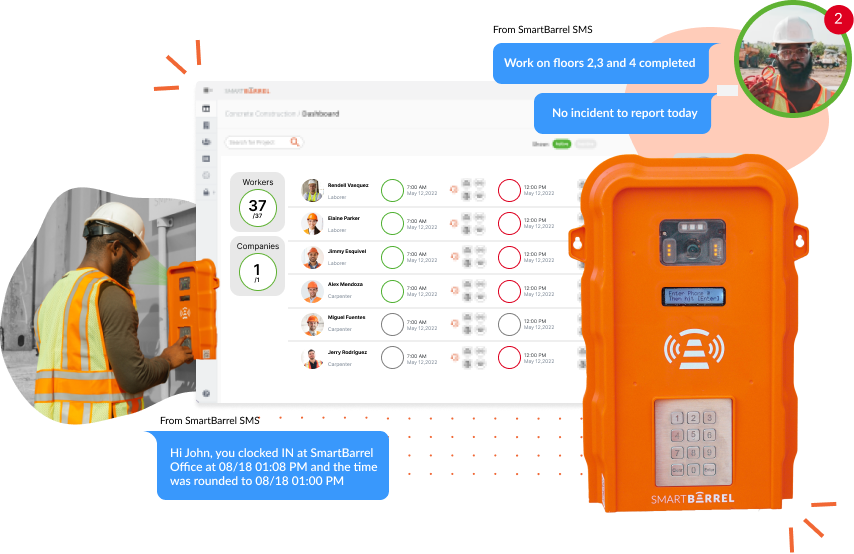
SmartBarrel is built on a premise every other platform approaches differently: before construction daily reports can be accurate, the labor data feeding them has to be accurate. Workers take a picture and enter their phone number at a TimeClock 4.0 device or mobile app to clock in. Once verified by AI, it creates time-stamped, auto-populated timesheets. Foremen add notes, upload photos, document safety incidents, and submit. The daily report is started automatically, before the foreman even starts for the day.
Here’s what makes SmartBarrel’s construction daily report app unique:
- Pre-populated every day : The log gets started for your foremen before they even open it.
- Workforce-driven daily logs: Verified punches and worker-submitted summaries reflect what actually happened on site.
- No extra tools: No additional paperwork, digital clipboard or separate app. Build, complete and submit daily logs within your time tracking solution.
- Presentation-Ready: One clean, organized record for PMs, GCs, and ownership.
For specialty trade contractors, this changes what construction daily reports actually are: a verified record that holds up when a GC disputes a T&M invoice or an insurance claim requires timestamped proof of who was on site.

Scores
Factor | Score |
Data Accuracy & Verification | 19/20 |
Field Readiness & Deployment | 20/20 |
Daily Reporting Features | 18/20 |
Integration Ecosystem | 14/15 |
Scalability | 15/15 |
User Experience & Support | 5/5 |
Value & Transparency | 3/5 |
Total | 94/100 |
Best Suited For
Specialty trade contractors (electrical, mechanical, concrete, drywall, solar, scaffolding, glass & glazing) or self-perform GCs with 100–5,000 field workers across multiple jobsites, particularly those on T&M contracts or prevailing wage work.
Key Features
Biometric Facial Verification
Workers clock in and out using facial verification. The system compares each scan against previously captured images and confirms identity with a green or red indicator. No photoshoot required – the system self-learns workers over time. Works with gloves and in harsh field conditions.
TimeClock 4.0 Hardware
A dedicated jobsite time clock with built-in LTE and biometric facial verification. Runs on solar or electric power. No WiFi dependency, no charging required, no manual setup for workers.
Mobile App
An easy-to-use mobile app that can be used as a shared check-in station. Use a foreman’s tablet in Kiosk Mode to capture punches. Or, use any smartphone. Download and set up the app in under 1 minute.
Automated Construction Daily Reports
Daily logs are self-populated with verified headcount, labor hours, manpower counts, and weather. Foremen review, add notes or photos as needed, and finalize. Reports are shared with project managers, GCs, or owners based on configured preferences. Safety incidents can be added via the mobile app or submitted by SMS at punch-out.
Live Dashboard
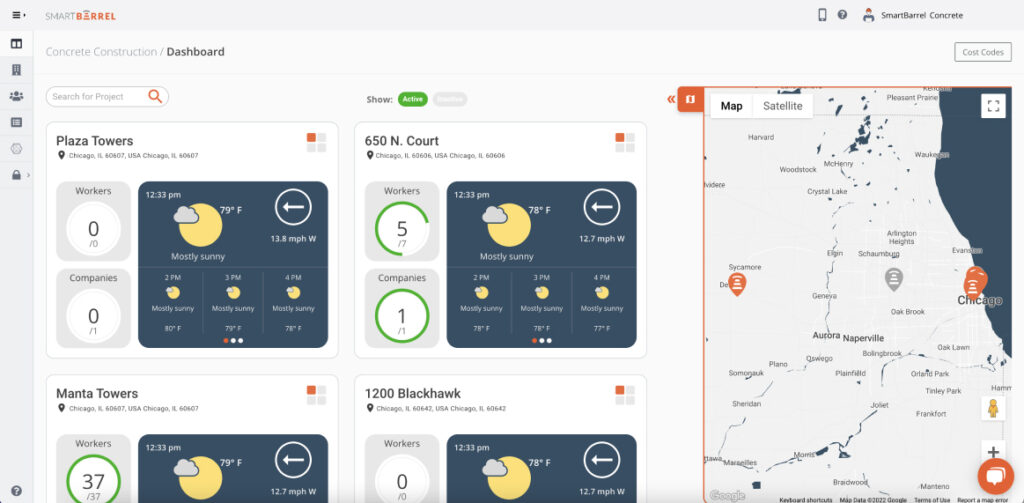
Real-time headcount and hours across all active jobsites, updating as workers clock in and out. Includes cost code assignment, automatic lunch break and rounding rules, and carry-over cost codes.
Cost Code Tracking
Labor hours are assigned to cost codes directly from the dashboard. Supports splitting and bulk apply codes for crews. Data flows into ERPs eliminating manual re-entry.
Safety Incident Documentation
Safety incidents are submitted through SMS at punch-out. When a worker receives an SMS confirmation of their punch, an automated text message is sent asking if they have any incidents to report. Workers have the option to receive messages auto-translated into Spanish. Incident records are included in Daily Summary Reports alongside labor hours, weather, and work notes.
Collaborator Reports
Daily logs and summary reports are shared with project managers, general contractors, or owners based on configured sharing preferences.
Integrations
SmartBarrel offers direct integrations with the following platforms:
When a direct integration is enabled, verified hours and cost codes transfers from SmartBarrel into the connected system along with associated job and cost structure information. This allows data captured in SmartBarrel to be used for payroll processing, job costing, reporting, and analytics without manual re-entry.
For Procore, SmartBarrel syncs hours and manpower data into Daily Logs to support project-level reporting.
API Access
SmartBarrel provides a public API for customers who need programmatic access to their data or integrations beyond the supported direct integrations. The API can be used to:
- Retrieve structured labor and operational data from SmartBarrel
- Support custom integrations or internal applications
- Automate data transfers based on internal schedules or workflows
API availability and usage are subject to configuration and access permissions.
Exports
SmartBarrel supports data exports for systems not connected through a direct integration or the API. Exports are available in standard formats and can be used for payroll and accounting uploads, data validation and reconciliation, and supplemental reporting.
Pricing
Contact SmartBarrel for a demo.
Pros | Cons |
Daily reports built on biometrically verified data, not foreman recall | |
Verified headcount pre-populates daily logs automatically | Pricing requires a sales conversation |
Best T&M billing documentation in the category | Primarily suited for trade contractors, not GCs |
Built-in LTE, no WiFi dependency | |
Scales from 100 to 5,000+ workers | |
Flexible punch options: TimeClock 4.0 hardware, Kiosk App, or Personal App | |
Tracks time by job and cost code for accurate labor reporting | |
Supports overtime calculations, break rules, union requirements, and certified payroll | |
Geofencing for mobile and kiosk punches so punches can only occur onsite | |
Works offline, capturing punches without internet or WiFi | |
Absentee tracking ensures no time gets missed at payroll | |
TimeClock 4.0 Built and assembled in the USA |
Reviews
“SmartBarrel was an obvious choice: a simple solution that provides very high quality, useful data.” Luke Harmon, Prism Electric
Capterra: 4.9 out of 5 stars – (14 reviews)
Your daily reports should start with verified data. See how SmartBarrel self-populates construction daily reports from biometric clock-in data, with no manual data entry, no end-of-day recall.
2. Procore: 79/100
Overview
Procore is a comprehensive construction management platform, not a standalone daily log app. Its Daily Logs module connects construction daily reports to drawings, RFIs, submittals, schedules, and budgets, keeping all project information in one central location. For GCs managing complex commercial projects, this integration depth is the value proposition.
For specialty trade contractors focused primarily on daily reports and labor documentation, Procore provides more features than what they might need. The ACV-based pricing model favors firms managing $50M+ annually.
SmartBarrel integrates with Procore: verified field data flows directly into Procore’s daily log module through the Procore integration for construction reporting, so contractors already on Procore don’t have to choose between the two.
The Procore time tracking integration works the same way for specialty contractors and self-perform GCs, syncing verified hours into Timesheets, Timecards, and Daily Logs so the field record and the Procore record never drift apart.
Scores
Factor | Score |
Data Accuracy & Verification | 12/20 |
Field Readiness & Deployment | 15/20 |
Daily Reporting Features | 18/20 |
Integration Ecosystem | 14/15 |
Scalability | 13/15 |
User Experience & Support | 5/5 |
Value & Transparency | 2/5 |
Total | 79/100 |
Best Suited For
Mid-to-large GCs managing complex commercial projects where daily reports need to connect with drawings, RFIs, submittals, and financials in a unified platform.
Key Features
Procore’s Daily Logs module covers manpower, equipment, weather conditions, materials, photos, and visitor tracking, with customizable templates and offline functionality for field teams. What sets it apart from standalone daily log apps is the direct connection between daily report entries and the broader project management stack: RFIs, submittals, drawings, and schedule items can all be linked from within a daily log.
Automated report distribution pushes completed daily reports to stakeholders without manual forwarding, and a task management layer ties field activity to project coordination. The site diary is accessible across all projects from a central location.
Integrations
Procore connects with QuickBooks, Sage, Viewpoint, CMiC, Autodesk, Oracle, and most major accounting tools and ERPs. Pairs with SmartBarrel for verified labor time tracking data.
Pricing
Contact Procore to get a custom quote.
Pros | Cons |
Daily logs connect with RFIs, submittals, drawings, and financials | High cost, better suited to large GCs than specialty subs |
Deepest ERP and accounting tools integration in this category | Steep learning curve and implementation overhead |
Site diary accessible across all construction projects | Daily reports still depend on manual field input as of September 2026 |
Unlimited users within contract tier | Pricing model makes quick comparison difficult |
Reviews
Capterra: 4.5 stars out of 5 (2,676 reviews)
Anurup M says: “The most essential aspect of Procore is that it provided us with an integrated system and procedures that allow us to ensure that all duties, as well as the process of issuing reports and other papers, are completed correctly. It also allowed us to keep track of all documents and reports, as well as their status, to minimize delays in their distribution or disruptions on the job site.”
3. eSUB: 73/100
Overview
eSUB is a mobile-first construction management platform built exclusively for commercial subcontractors. Where most daily report apps are designed for the broader construction market and adapted for subs, eSUB starts from a subcontractor’s actual workflow: tracking change orders from GCs, managing field tickets, documenting T&M work, and capturing daily logs from crews in the field.
The daily report feature pulls directly from timecards and field activity already entered in the app. Crew mix, labor performed, visitors, equipment, accident reports, delay hours, weather, and site conditions all feed into a structured daily log without requiring a separate documentation pass. For specialty trade contractors on electrical, mechanical, plumbing, or drywall work, the terminology and workflows are built around how subs actually operate, not how a GC manages them.
As a software-only solution, eSUB does not include dedicated hardware for attendance verification. Daily reports reflect what field teams enter via the mobile app, and headcounts are self-reported rather than pulled from biometrically verified clock-in data.
Scores
Factor | Score |
Data Accuracy & Verification | 11/20 |
Field Readiness & Deployment | 15/20 |
Daily Reporting Features | 17/20 |
Integration Ecosystem | 12/15 |
Scalability | 11/15 |
User Experience & Support | 5/5 |
Value & Transparency | 2/5 |
Total | 73/100 |
Best Suited For
Commercial specialty subcontractors (electrical, mechanical, plumbing, HVAC, drywall) managing T&M work, change orders, and daily documentation across multiple projects from a subcontractor-first workflow.
Key Features
eSUB’s daily reports are generated directly from field timecards, capturing crew mix, labor performed, visitors, equipment, delay hours, weather, and accident reports without requiring a separate documentation step. The Field Works mobile app lets crews submit daily logs, field notes, and photos from any device in real time. Change order tracking, RFI management, submittal workflows, and T&M documentation are built into the same platform, so daily reporting connects to the full subcontractor project management workflow. A centralized site diary keeps all project documentation searchable and accessible across office and field teams.
Integrations
eSUB connects with Procore, QuickBooks Online, QuickBooks Desktop, Sage 100, Sage 300, Viewpoint Vista, Key2Act, and other accounting platforms via flat file export.
Pricing
Pricing is not publicly listed.
Pros | Cons |
Built exclusively for commercial subcontractors, with workflows that match how subs actually operate | Software-only, with no dedicated hardware for attendance verification as of September 2026 |
Daily reports generate directly from timecards, with no separate documentation step | Pricing not publicly listed; requires a sales conversation |
T&M tracking, change orders, and daily logs in one platform | Per-user cost can scale up for larger field crews |
Subcontractor-specific terminology for electrical, mechanical, plumbing, and drywall trades | |
Integrates with Procore, QuickBooks, Sage, and Viewpoint Vista |
Reviews
Capterra: 4.5 stars out of 5 (256 reviews)
Cody W. says: “This product is great all around in terms of use, filing and be able to send them electronically to general contractors is a huge plus. We use the notes sections for progress photos or photos of delays. I can even title daily reports on days where i have rain days or days I do my safety meetings. It’s helped our company as a whole be more efficient with paper work filing and time spent filling out papers making copies as well as storing progress photos. We recently started using the calendar for milestones and it’s going to help even more.”
4. Workyard: 73/100
Overview
Workyard is a construction operations platform built for specialty contractors and self-performing GCs. It combines GPS-verified time tracking, job costing, scheduling, Smart Forms, and daily reporting in one system, with the goal of connecting field activity directly to labor costs and payroll.
Daily reports in Workyard are built through Smart Forms, a structured digital form system that supports photos, signatures, timestamps, location data, submission routing, and PDF Professional Reports. The Timecard Autofill feature can pull labor data from timecards into a Smart Form, and forms can be triggered at clock-in or clock-out, by geofence entry, or through task assignment. Project managers can review completed forms, access project-level form records, and route submissions to the appropriate stakeholders in real time.
Workyard supports multiple clock-in methods. Mobile workers clock in via GPS-verified app. Teams can also deploy a shared iPad kiosk with PIN and clock-in facial photos for worksites where a shared device makes more sense than individual phones. Workyard does not manufacture a proprietary weatherproof hardware device, which is a meaningful distinction for contractors managing large outdoor crews in demanding conditions.
For specialty contractors and self-performing GCs that need GPS-verified time tracking, job costing, Smart Forms-based daily reporting, and payroll integration in one platform, Workyard is a strong option. Contractors that specifically require a proprietary weatherproof clock or biometric identity verification should compare Workyard’s mobile and iPad kiosk workflows with dedicated hardware systems.
Scores
Factor | Score |
|---|---|
Data Accuracy & Verification | 13/20 |
Field Readiness & Deployment | 16/20 |
Daily Reporting Features | 15/20 |
Integration Ecosystem | 13/15 |
Scalability | 9/15 |
User Experience & Support | 5/5 |
Value & Transparency | 2/5 |
Total | 73/100 |
Best Suited For
Specialty contractors and self-performing GCs needing GPS-verified time tracking, Smart Forms-based daily reporting, job costing, and payroll integration in one platform.
Key Features
Workyard’s daily reporting is built on Smart Forms: structured digital forms with photos, signatures, timestamps, location data, PDF Professional Reports, and submission routing. The Timecard Autofill feature pulls labor data from verified timecards into Smart Forms automatically. Forms can be triggered at clock-in or clock-out, by geofence entry, or through task assignment, reducing the manual step of opening and starting a daily log. The platform includes Smart Form templates for daily reports, safety inspections, incident reports, and toolbox talks. Mobile clock-ins are GPS-verified; kiosk clock-ins support PINs and clock-in facial photos on a shared iPad. A live crew location map gives project managers real time visibility across all active jobsites, and scheduling, job costing, and compliance tools are included in the same platform.
Integrations
Workyard connects with QuickBooks Online, QuickBooks Desktop, ADP Run, ADP Workforce Now, Gusto, Paychex, Sage 100, Sage 300, Foundation Software, ComputerEase, Viewpoint Spectrum, Procore, and more. Verify the current full list at workyard.com/time-tracking-integrations.
Pricing
Pricing is not publicly listed on Workyard’s pricing page. Based on third-party sources, plans start at approximately $6/user/month, billed annually. Monthly billing is also available. Pro, Autopilot, and Enterprise pricing is available from Workyard’s sales team.
Pros | Cons |
|---|---|
Smart Forms with Timecard Autofill connects time tracking and daily reporting in one step | Does not manufacture a proprietary weatherproof hardware device for jobsite clock-in |
Multiple clock-in options: GPS mobile, shared iPad kiosk with PIN and clock-in facial photos | Pricing not publicly listed on vendor’s own pricing page |
Deep payroll integration ecosystem: QuickBooks, ADP, Gusto, Sage, Foundation, ComputerEase, Procore, and more | Some users report higher battery usage for workers who drive frequently between sites |
Smart Form templates for daily reports, safety inspections, incident reports, and toolbox talks | Per-user plus base fee pricing scales up for larger crews |
Scheduling, job costing, and compliance tools in the same platform |
Reviews
Capterra: 4.8 out of 5 stars (102 reviews). Users consistently cite GPS time tracking accuracy, job costing clarity, and payroll integration as primary strengths. Some users note concerns around billing or cancellation handling.
5. Forma Build (formerly Autodesk Build): 72/100 (Good)
Overview
Forma Build offers construction daily reports linked to BIM models, RFIs, submittals, and drawings within the Autodesk Forma suite. The site diary connects field activity to model revisions and drawing updates, which matters for design-build projects where document progress tracking is critical.
For most specialty trade contractors focused on crew accountability, labor hours, and billing documentation, the BIM integration adds capability they’re unlikely to use. Best suited to teams already invested in Autodesk’s broader toolset.
Scores
Factor | Score |
Data Accuracy & Verification | 11/20 |
Field Readiness & Deployment | 14/20 |
Daily Reporting Features | 16/20 |
Integration Ecosystem | 13/15 |
Scalability | 10/15 |
User Experience & Support | 4/5 |
Value & Transparency | 4/5 |
Total | 72/100 |
Best Suited For
Construction teams already in Autodesk’s ecosystem who need daily reports linked to BIM models and complex project coordination workflows.
Key Features
Forma Build’s daily logs connect directly to BIM model elements, drawings, and RFI workflows, so field documentation is linked to the design model rather than sitting in a separate system. Photo documentation and video attachments tie visual evidence to specific model locations and drawing versions.
The site diary maintains a searchable record of all daily reports linked to model revisions and drawing updates, making it particularly useful for tracking project progress on complex design-build work. Offline functionality and real time access across construction teams complete the platform’s field reporting capabilities.
Integrations
Forma Build connects with Procore, Sage 300 CRE, Sage Intacct, QuickBooks Online, Xero, CMiC, SAP, Viewpoint Vista, Viewpoint Spectrum, JD Edwards, Acumatica, SharePoint, Box, Google Drive, Smartsheet, Salesforce, Microsoft Dynamics, and more via Forma Construction Connect.
Pricing
Forma Build Essentials starts at $67/month per user (billed annually). Forma Build per user is $117/month (billed annually). Enterprise pricing requires contacting sales.
Pros | Cons |
BIM-linked construction daily reports | Most valuable only within the Autodesk ecosystem |
Deep integration across Autodesk suite | Significant learning curve |
Real time access with offline sync | High cost for daily reporting functionality alone |
Reviews
Capterra: 4.3 stars out of 5 (2,212 reviews)
Emilio R. says:”Overall, I would say it is a high-quality software platform that offers a wide range of tools and solutions for managing construction projects. While there may be some limitations or areas for improvement, the platform is generally well-regarded by us and it worked quite well for our company in very specific projects.”
4. Mitti (by SafetyCulture): 70/100
Overview
Mitti is the strongest option in this list for safety compliance, OSHA audit trails, and corrective action documentation. Construction daily reports are built around structured checklists and inspection workflows rather than labor tracking, purpose-built for teams where safety incidents and quality audits are the primary priority.
For specialty contractors whose daily reports need to serve as labor documentation and T&M billing backup, the inspection-first design serves a different goal.
Scores
Factor | Score |
Data Accuracy & Verification | 10/20 |
Field Readiness & Deployment | 16/20 |
Daily Reporting Features | 15/20 |
Integration Ecosystem | 10/15 |
Scalability | 9/15 |
User Experience & Support | 5/5 |
Value & Transparency | 5/5 |
Total | 70/100 |
Best Suited For
Construction teams where OSHA safety compliance, quality audits, and corrective action tracking are the primary daily reporting priority.
Key Features
Mitti’s daily reporting is built around structured inspection workflows with digital checklists and sign-offs rather than a traditional daily log format. Safety incident documentation flows directly into corrective action tracking, creating an audit trail that supports OSHA compliance without additional data entry.
Completed inspections automatically generate construction daily reports, so the documentation process is tied to the inspection itself rather than a separate step. The site diary maintains a complete inspection history across all projects, and toolbox talk templates with photo documentation and offline access round out the platform’s field capabilities.
Integrations
Mitti connects with Procore, Microsoft Power BI, Microsoft SharePoint, Microsoft Excel, Google Drive, Google Sheets, Salesforce, SAP SuccessFactors, Dropbox, and more.
Pricing
Free plan for teams up to 10. Premium at $29/seat/month billed annually ($29/month billed monthly). Enterprise pricing requires contacting sales.
Pros | Cons |
Best safety compliance documentation in this category | Inspection-first; labor documentation is secondary |
Corrective action tracking for OSHA compliance | Per-seat pricing scales up for large crews |
Free plan; robust offline access | Limited ERP and payroll integration depth |
User friendly across iOS and Android |
Reviews
Capterra: 4.6 stars out of 5 (355 reviews)
“Overall, Mitti (by SafetyCulture) has been good to use. It helps with inspections, audits and keeping records organised. The main things I think could improve are the scoring system, corrective actions, and having better control over internal versus external reports. Being able to create two versions of a report would be very helpful, because it would reduce the risk of internal peer review notes being shown externally by mistake.”
7. Fieldwire: 67/100
Overview
Fieldwire is built around task management, plan markup, and jobsite communication. Its daily report capabilities work within a broader workflow that includes blueprint access and issue tracking. The site diary tracks task and field activity history tied to specific plan locations, most useful when daily reporting is inseparable from plan coordination.
For specialty trade contractors whose construction daily report priorities are crew accountability, safety incidents, and billing documentation, Fieldwire’s features are functional but less specialized than platforms built for labor documentation.
Scores
Factor | Score |
Data Accuracy & Verification | 9/20 |
Field Readiness & Deployment | 15/20 |
Daily Reporting Features | 14/20 |
Integration Ecosystem | 11/15 |
Scalability | 8/15 |
User Experience & Support | 5/5 |
Value & Transparency | 5/5 |
Total | 67/100 |
Best Suited For
Field engineers and project teams needing task management and plan markup integrated with daily reports.
Key Features
Fieldwire’s daily reports sit within a broader task coordination workflow rather than functioning as a standalone reporting tool. Field notes and task status updates feed directly into the daily log, and blueprint markup ties field activity to specific plan locations and drawing versions.
Task management with customizable status workflows lets teams escalate issues from the daily report to assigned tasks without switching systems. The site diary maintains a running record of task and field activity across the project, with offline access and real time syncing keeping field and office aligned.
Integrations
Fieldwire connects with Procore, Viewpoint, Autodesk Construction Cloud, Bluebeam, Box, Dropbox, Google Drive, OneDrive, Zapier, and more.
Pricing
Basic plan is free. Pro at $54/user/month, Business at $74/user/month, and Business Plus at $104/user/month, all billed annually. Custom contracts available for enterprise.
Pros | Cons |
Strong task management tied to daily reports | Limited labor data verification |
User friendly interface with offline access | ERP and payroll integration depth appears limited |
Free plan for smaller teams | Per-user cost scales up for large crews |
Reviews
Capterra: 4.6 stars out of 5 (99 reviews)
Patrick B. says” Overall I’ve been very satisfied with using Fieldwire as a field report and punch list tool. The use of voice dictation to create punch list items speeds up the process significantly. Customer service has been helpful when needed, and there is a library of videos online to assist with questions or training.”
8. Buildertrend: 57/100
Overview
Buildertrend is designed for residential builders and remodelers. Its daily log lets builders post project progress updates, add notes, upload photos, and share construction daily reports with clients through a client-facing portal. For residential GCs, the combination of daily logs, scheduling, and client communication in one place serves a distinctly different workflow from commercial specialty contracting.
For commercial specialty trade contractors in electrical, mechanical, concrete, drywall, and scaffolding, T&M documentation, multi-site labor tracking, union compliance, and ERP integration at scale are not Buildertrend’s primary design targets.
Crews moving job to job all day is exactly the scenario where hours get miscounted, whether that’s cost coding or the pay owed for the time between stops.
Scores
Factor | Score |
Data Accuracy & Verification | 7/20 |
Field Readiness & Deployment | 13/20 |
Daily Reporting Features | 13/20 |
Integration Ecosystem | 8/15 |
Scalability | 7/15 |
User Experience & Support | 5/5 |
Value & Transparency | 4/5 |
Total | 58/100 |
Best Suited For
Residential builders and remodelers focused on client-facing project transparency and home-build project management.
Key Features
Buildertrend’s daily logs cover weather conditions, manpower, materials, and work completed, with the ability to add notes, upload photos, and write work summaries directly from a mobile device.
The standout feature for residential builders is the client-facing portal, which lets homeowners view project progress updates and daily report activity without needing to contact the project manager directly. The site diary keeps a running record of all project activity accessible to the full project team. Mobile access on iOS and Android supports field documentation from anywhere on the jobsite.
Integrations
Buildertrend connects with QuickBooks Online, QuickBooks Desktop, Xero, Gusto, Salesforce, HubSpot, Pipedrive, and more.
Pricing
Pricing is not publicly listed. Buildertrend provides custom quotes based on business type and annual construction volume.
Pros | Cons |
Strong client-facing transparency for residential projects | Not designed for commercial specialty trade contractors |
User friendly for non-technical users | Limited commercial ERP integration depth |
Client portal keeps homeowners informed | Larger projects appear to outgrow the platform |
Easy to upload photos and share updates |
Reviews
Capterra: 4.5 stars out of 5 (2,487 reviews)
Dillon B. says: “Our company used us for several months and got great feedback from most of our clients about its reporting features and it made us more organized in how we managed projects.”
How Does the Daily Report App Work?
A foreman opens the app at the start or end of the shift and completes a structured daily log: crew count, work completed, weather conditions, equipment usage, and any safety incidents. They upload photos, add notes, and submit. The construction daily report flows to the office in a formatted PDF or digital record.
When the narrative section still needs polish, a generative AI prompt can tighten the foreman’s notes into client-ready language without touching the logged hours.
Where construction daily report apps differ is in what data the report is built on. App-only tools depend on someone typing the right information at the right time. More advanced platforms start from verified data (biometric clock-ins, real-time headcounts, GPS confirmation) and let foremen add notes and photos on top of data that’s already accurate.
SmartBarrel is the furthest along this spectrum. Workers scan their face at the TimeClock 4.0, that verified check-in self-populates the daily log, and the foreman adds context. The report is built on data that was never manually entered.
What Are the Benefits of Daily Report App Software?
Construction daily reports have been around as long as the industry itself. What’s changed is what becomes possible when the process goes digital. The benefits below are what contractors running multi-site operations actually gain when daily logs stop being a manual exercise and start being a verified record of what happened in the field.
Accurate project records without end-of-day reconstruction
Digital tools capture field activity as it happens. Construction professionals don’t have to rely on memory.
T&M billing defense
Construction daily reports are the invoice backup on time-and-materials contracts. Timestamps, verified headcounts, and photo documentation are far harder to dispute than a handwritten form assembled from memory.
Compliance documentation
OSHA’s recordkeeping requirements mandate that construction companies with more than 10 employees maintain records of work-related injuries and illnesses. Daily report software with safety incident documentation creates the audit trail automatically.
Real time access across jobsites
Project managers can see what’s happening across all construction projects from one central location, without calling foremen.
That single view depends on a jobsite activity record that updates as the day happens, not a stack of forms waiting to be typed up back at the office.
Saving time on payroll and reporting workflows
When daily logs integrate with time tracking and ERP systems, manual data entry between field and office collapses. Thalle Construction reduced payroll processing time by 97% after switching to SmartBarrel’s verified workflow.
A site diary that builds itself
Every daily report becomes part of a searchable project history, useful for dispute resolution, project performance analysis, and future project planning.
Why Specialty Contractors Need More Than a Reporting App
Every tool in this list makes daily reports faster than paper. That’s the baseline in 2026, not a differentiator.
The real question is what the construction daily reports are built on. When headcount comes from a foreman’s memory and crew data is typed in manually, daily logs reflect approximations. When a billing dispute arrives, those approximations become negotiating positions, not records.
Apache Industrial used SmartBarrel’s biometrically verified construction daily reports to stop T&M billing disputes before they started. Because every worker’s presence is confirmed at clock-in, the daily log doesn’t depend on anyone’s recollection. It depends on a timestamped, facial-verified record of jobsite activity.
SmartBarrel’s automated construction daily log software builds daily reports from verified field data rather than asking someone to reconstruct the day. For construction professionals who need daily reports to serve as billing documentation, compliance records, and project management data simultaneously, that distinction is the difference between a tool and a system.
How Construction Daily Reports Protect You in Billing Disputes
Construction daily reports are the paper trail that gets specialty contractors paid on T&M work. A daily log with verified timestamps, biometric headcount data, and photo documentation is fundamentally different from a form assembled from memory at the end of shift. One holds up in a dispute. The other invites it.
The same applies to safety documentation. OSHA penalties for willful violations can reach $70,000 per incident. Construction daily reports that capture safety incidents at the time they occur provide far stronger compliance documentation than daily logs assembled after the shift ends.
The contractors in the most defensible position build that discipline into their daily workflow, not because something went wrong, but because documentation that was right the first time is what saves time when it matters.
How to Choose the Right Construction Daily Report App for Your Team
Not every platform on this list is the right fit for every operation. The right construction daily report app depends on your contract type, crew size, and what you need daily reports to actually do. Use the scenarios below to find your match.
You’re on T&M contracts and billing accuracy is non-negotiable
A daily log app built on manually entered headcounts creates exposure every billing cycle. SmartBarrel’s biometric verification is built for this. Saving time on dispute resolution starts with verified data at the source.
You’re managing 10+ jobsites with 500+ field workers
You need multi-site visibility, verified attendance, and construction daily reports that scale without adding overhead. SmartBarrel is designed for this scenario.
Your primary need is subcontractor-specific project management with daily reporting built in
eSUB is built exclusively for commercial subs, with daily reports, T&M tracking, change orders, and RFIs in one platform designed around how specialty trades actually work..
OSHA safety compliance is the priority
SafetyCulture’s inspection-first platform with corrective action tracking is purpose-built for this need.
You’re a residential builder
Buildertrend’s client portal and integrated project management are designed for your workflow.

Frequently Asked Questions About Construction Daily Logs
Can construction daily report apps help with prevailing wage compliance documentation?
Yes, but only if the app captures verified labor data. Prevailing wage compliance requires accurate documentation of hours worked by trade classification. SmartBarrel’s biometric verification and cost code tracking make prevailing wage documentation significantly more defensible, particularly for contractors managing union and non-union crews across multiple states.
How do construction daily log apps handle multi-trade or multi-company jobsites?
Most construction daily report software handles multi-trade jobsites through collaborator or subcontractor reporting features that allow each company to submit their own daily logs within a shared project. The data accuracy challenge is ensuring crew counts across trades are reconciled correctly.
SmartBarrel solves this at the source: each contractor’s workers clock in biometrically at their own TimeClock device, so headcount is verified independently rather than consolidated into a single manually entered report. When a billing dispute or headcount discrepancy arises, every trade has its own timestamped, verified record.
What's the difference between a daily log and a daily report in construction?
A daily log is the real-time record of jobsite activity: workers present, work completed, weather conditions, equipment usage, safety incidents as they occur. A daily report is the compiled, formatted output sent to stakeholders. The best construction daily report software builds the report from the underlying daily log data automatically, so both records are consistent without requiring separate documentation effort.
SmartBarrel automates your construction daily reports from biometrically verified field data. See how it works for your operation.
Detailed Scoring Breakdown
This section provides the full scoring rationale for each platform across all 7 factors. Each app’s breakdown is a collapsible section.
SmartBarrel: 94/100
Data Accuracy & Verification: 19/20
Positive:
- Biometric AI-powered facial verification. Workers cannot clock in for each other
- Self-learning system requires no pre-upload of worker photos
- GPS tracking with geofencing confirms workers are physically on the jobsite
- Built-in LTE connectivity, and verified data flows in real time, not batch-synced
- Complete audit trail with timestamps on every check-in and check-out
- Self-registered fob system for workers without smartphones
Negative:
- 1 point deducted as no system can claim 100% fraud-proof status in all theoretical scenarios
Field Readiness & Deployment: 20/20
Positive:
- Under 1-minute setup time for TimeClock 4.0
- Weatherproof hardware, magnetic mounting, solar or electric powered
- Built-in LTE, no WiFi dependency on the jobsite
- Works with gloves, welded fingerprints, PPE
- No worker smartphone required
- Three deployment options: TimeClock 4.0 hardware, Kiosk App, Personal App
- Zero training required for workers
Daily Reporting Features: 18/20
Positive:
- Verified headcount auto-populates construction daily reports at clock-in, with zero manual data entry for attendance
- Automatic weather capture included in every daily log
- Safety incident documentation via mobile app or SMS prompt at punch-out
- Work summary notes and photo documentation added by foremen
- Toolbox talk documentation
- Site diary built automatically from verified daily report history
- Collaborator reports feature for sharing with GCs and stakeholders
- Cost codes assigned with one click, including splitting
- T&M billing documentation backed by biometric verification timestamps
Negative:
- 1 point deducted as voice to text recording for daily notes is primarily available through the mobile app rather than hardware
- 1 point deducted as some specialized certified payroll report formats may require additional configuration
Integration Ecosystem: 14/15
Positive:
- Native integrations: Procore (Timesheets, Timecards, Daily Logs), CMiC, Viewpoint Vista, PowerBI, Plexxis
- Compatible systems: QuickBooks Online and Desktop, Foundation, ComputerEase, Jonas, Acumatica, Sage, COINS, ECCS
- Direct payroll system connections; daily log data flows to payroll without manual re-entry
Negative:
- 1 point deducted as some integrations (Foundation, Acumatica, Viewpoint Spectrum, Sage Intacct) are in development at time of writing
Scalability: 15/15
Positive:
- Used by contractors managing 100–5,000+ field workers
- Multi-site operations supported across 10+ jobsites simultaneously
- Multi-state capabilities with union and prevailing wage support
- Enterprise-grade real-time visibility across all construction projects
- Customer references: Apache Industrial (6,000+ field employees), Thalle Construction (17 jobsites, 2,000+ workers), Western Partitions (500+ projects)
User Experience & Support: 5/5
Positive:
- Capterra: 4.9/5 | Google Play: 3.7/5 | Apple App Store: 3.9/5
- Consistent user feedback on ease of use for field crews and office teams
- 2–3 day average implementation timeline
- Dedicated onboarding and training support
Review scores current as of September 2026
Value & Transparency: 3/5
Positive:
- Documented ROI: $4,285+ savings per worker annually, 800+ hours saved on manual entry
- Case study proof: Southwest Plumbing (40% payroll processing time reduction), Thalle Construction (97% reduction)
- Transparent disclosure of third-party integration fees (CMiC, Plexxis charge annual API fees)
Negative:
- 2 points deducted as pricing is not publicly listed and requires a sales conversation. SmartBarrel prices are customized to each contractor’s workforce size, hardware needs, and integration complexity, which helps align cost to value but makes quick price comparison harder for buyers.
Procore: 79/100
Data Accuracy & Verification: 12/20
Positive:
- Cloud-based records with audit trail
- GPS location capture on mobile submissions
- Offline sync with automatic reconnection
- Extensive permission controls on data editing
Negative:
- Construction daily reports depend on manual input from field teams
- No dedicated biometric verification for attendance
- Verification is location-based rather than worker-presence-based
Field Readiness & Deployment: 15/20
Positive:
- Mobile app on iOS and Android with offline functionality
- Implementation support available
Negative:
- Steep learning curve; significant setup and training time required
- Full platform complexity can be overwhelming for field teams focused on daily reporting
Daily Reporting Features: 18/20
Positive:
- Daily Logs module covers manpower, equipment usage, weather conditions, materials, photos, and visitor tracking
- Direct links between daily log entries and RFIs, submittals, drawings, and schedule items
- Automated distribution of construction daily reports to stakeholders
- Task management tied to daily field activity
- Site diary accessible across all construction projects
- Highly customizable construction daily report templates
Negative:
- Daily report data depends on manual field input
- Full feature depth requires platform familiarity
Integration Ecosystem: 14/15
Positive:
- Extensive ecosystem: QuickBooks, Sage, Viewpoint, CMiC, Autodesk, Oracle, and more
- SmartBarrel integrates with Procore for verified labor data in daily logs
Negative:
- Platform lock-in can complicate supplementing with best-of-breed tools
Scalability: 13/15
Positive:
- Enterprise-grade platform used by the largest GCs globally
- Unlimited users within contract tier
Negative:
- ACV pricing becomes prohibitively expensive for mid-market specialty contractors
- Platform complexity adds overhead at scale
User Experience & Support: 5/5
Positive:
- Capterra: 4.5 stars out of 5 (2,677 reviews)
- Extensive training resources and certification programs
Negative:
- Steep learning curve consistently noted in user reviews
- Field teams with limited tech experience report friction
Value & Transparency: 2/5
Positive:
- Comprehensive platform reduces need for multiple standalone tools
Negative:
- Pricing not publicly available
- Mid-market costs start around $10,000–35,000+ annually based on publicly available benchmark data
eSUB: 73/100
Data Accuracy & Verification: 11/20
Positive:
- Timestamps on all field entries and daily log submissions
- Cloud-based records with audit trail
- Daily reports pull directly from timecard data already entered in the field
Negative:
- No biometric or hardware-based attendance verification
- Headcount in daily reports is self-reported by field crews
- Software-only, with no dedicated field hardware for high-volume worksites
Field Readiness & Deployment: 15/20
Positive:
- Mobile-first design on iOS and Android
- Works from any device including tablets and smartphones
- No hardware installation required, allowing quick deployment
Negative:
- Some users report the mobile app has fewer features than the desktop version based on publicly available reviews
- Does not function for workers without smartphones or mobile devices
Daily Reporting Features: 17/20
Positive:
- Daily reports generate automatically from timecards, capturing crew mix, labor performed, visitors, equipment, delay hours, weather, and accident reports in one step
- Field Works mobile app supports real time daily log submission from the jobsite
- T&M documentation built into the same workflow as daily reports
- Change order tracking and RFI management connected to daily field activity
- Site diary with complete, searchable project documentation history
- Photo documentation and field notes attached to daily reports
- Customizable forms and workflows for trade-specific needs
Negative:
- Daily report data depends on manual input, with no auto-population from verified clock-ins
- Voice to text recording not prominently described in publicly available documentation
Integration Ecosystem: 12/15
Positive:
- Procore integration for project management workflow connection
- Accounting integrations: QuickBooks Online, QuickBooks Desktop, Sage 100, Sage 300, Viewpoint Vista, Key2Act
- Flat file export compatible with most construction accounting systems
Negative:
- API described as less open than some competitors based on publicly available user reviews
- Verify current integration list at esub.com before purchase
Scalability: 11/15
Positive:
- Used by commercial subcontractors across electrical, mechanical, plumbing, and specialty trades
- Supports multiple simultaneous projects
- Cloud-based platform accessible from any device or location
Negative:
- Primarily suited to subcontractors; not designed for GC or owner-side workflows
- Per-user pricing scales costs as crews grow
User Experience & Support: 5/5
Positive:
- Capterra: 4.5/5 based on 256 verified reviews
- Users consistently cite ease of adoption for subcontractor-specific workflows
- Active customer support and onboarding resources
Negative:
- Some users note the mobile interface could be more feature-complete
Review scores current as of September 2026
Value & Transparency: 2/5
Positive:
- Subscription-based pricing model, with no hardware costs required
Negative:
- 2 points deducted as pricing is not publicly listed and requires a sales conversation
- No published tiers or starting price on the vendor’s own site
Workyard 73/100
Data Accuracy & Verification: 13/20
Positive:
- GPS-verified mobile clock-ins confirm worker location at time of entry
- Shared iPad kiosk option supports PIN and clock-in facial photos for worksites using a fixed device
- Geofencing available to restrict clock-ins to designated jobsite areas
- Cost codes assigned at clock-in, with data flowing directly to job costing
- Complete audit trail with timestamps on all field entries
- Project Time Tracking Agent can detect site visits and allocate time to the correct job based on configured rules
Negative:
- Mobile clock-in relies on GPS location rather than biometric identity verification at a fixed device
- Workyard does not manufacture a proprietary weatherproof hardware device; the kiosk option requires a contractor-provided iPad
- GPS-based verification via mobile device has inherent limitations that a fixed biometric device addresses
Field Readiness & Deployment: 16/20
Positive:
- Mobile-first design on iOS and Android
- Offline time capture syncs automatically when connection returns
- Quick setup with no proprietary hardware installation required
- Shared iPad kiosk option available for worksites with limited individual phone access
- Live crew location map gives project managers real time jobsite visibility
Negative:
- Does not include a proprietary weatherproof hardware device for permanent outdoor installation
- Some users report higher battery usage on routes with frequent driving, based on publicly available reviews
- Phone permission requirements (location access) can raise questions from workers unfamiliar with GPS tracking apps
Daily Reporting Features: 15/20
Positive:
- Smart Forms support photos, signatures, timestamps, location data, submission routing, and PDF Professional Reports
- Timecard Autofill pulls verified labor data from timecards into Smart Forms automatically
- Forms can be triggered at clock-in, clock-out, geofence entry, or task assignment
- Smart Form library includes templates for construction daily reports, safety inspections, incident reports, and toolbox talks
- Project-level form records keep all documentation searchable and organized
- Scheduling and daily reporting connected in the same platform
Negative:
- Daily reporting is one component of a broader operations platform rather than a dedicated daily report tool
- Smart Forms require configuration; daily reports do not generate automatically without setup
Integration Ecosystem: 13/15
Positive:
- Native integrations: QuickBooks Online, QuickBooks Desktop, ADP Run, ADP Workforce Now, Gusto, Paychex, Sage 100, Sage 300, Foundation Software, ComputerEase, Viewpoint Spectrum, Procore
- Two-way sync with Gusto confirmed based on publicly available documentation
- Developer API available for custom connections
Negative:
- Some enterprise ERP integrations available on higher-tier plans only based on publicly available documentation
- Verify current integration list at workyard.com/time-tracking-integrations before purchase
Scalability: 9/15
Positive:
- Used by contractors ranging from small crews to large multi-site operations based on publicly available documentation
- Supports multiple simultaneous projects and jobsites
- Cloud-based platform accessible from any device
Negative:
- Per-user plus base fee pricing increases costs significantly as crews grow
- Contractors that prefer a proprietary weatherproof clock for permanent outdoor installation will need to use Workyard’s iPad kiosk or mobile workflows instead
User Experience & Support: 5/5
Positive:
- Capterra: 4.8/5 (102 reviews)
- Users consistently cite responsive customer support with fast callbacks and follow-up
- Clean, intuitive mobile interface noted in user reviews
Negative:
- Some users report questions around billing or cancellation handling based on publicly available reviews
Value & Transparency: 2/5
Positive:
- 14-day free trial available with no credit card required
- Based on third-party sources, entry-level pricing starts at approximately $6/user/month with a $50/month base fee
Negative:
- 2 points deducted as pricing is not publicly listed on Workyard’s own pricing page and requires contacting sales for confirmation
- No published plan tiers or feature-to-price mapping directly on vendor’s site
Forma Build: 72/100
Data Accuracy & Verification: 11/20
Positive:
- GPS location capture and timestamps on daily report entries
- Cloud-based records with audit trail
- Offline sync with automatic reconnection
Negative:
- No dedicated biometric or hardware verification
- Construction daily reports depend on manually entered field data
Field Readiness & Deployment: 14/20
Positive:
- Mobile app with offline functionality on iOS and Android
- Real time access across construction teams
Negative:
- Platform complexity creates a learning curve for field teams
- Maximum value requires prior Autodesk ecosystem experience
Daily Reporting Features: 16/20
Positive:
- Daily logs linked directly to BIM model elements, drawings, and RFI workflows
- Photo documentation and video attachments
- Site diary linked to model revisions and drawing updates
- Track project progress against design models
- Offline mobile access for field teams
Negative:
- BIM-linked reporting adds complexity for contractors who don’t need it
- Daily report data depends on manual input
Integration Ecosystem: 13/15
Positive:
- Procore, Sage 300 CRE, Sage Intacct, QuickBooks Online, Xero, CMiC, SAP, Viewpoint Vista, Viewpoint Spectrum, JD Edwards, Acumatica, SharePoint, Box, Google Drive, Smartsheet, Salesforce, Microsoft Dynamics, and more via Forma Construction Connect
Negative:
- Integration value primarily concentrated within Autodesk’s own ecosystem
Scalability: 10/15
Positive:
- Enterprise-capable for large commercial projects
Negative:
- Most valuable for teams already in the Autodesk ecosystem
- Per-project pricing scales costs for high-volume operations
User Experience & Support: 4/5
Positive:
- Capterra: 4.3 stars out of 5 (2,212 reviews)
- Autodesk’s extensive support and training resources
Negative:
- Significant learning curve noted in user reviews
Value & Transparency: 4/5
Positive:
- Pricing publicly listed: Essentials at $67/month/user and per-user plan at $117/month/user (billed annually). Enterprise tier requires a sales conversation
Negative:
- 1 point deducted as enterprise tier pricing requires contacting sales.
Mitti (by SafetyCulture): 70/100
Data Accuracy & Verification: 10/20
Positive:
- GPS and timestamps on inspection entries
- Photo documentation with annotation
- Cloud-based audit trail
Negative:
- No biometric or hardware-based labor verification
- Headcount in construction daily reports is self-reported
- Verification focused on inspection completion rather than worker presence
Field Readiness & Deployment: 16/20
Positive:
- User friendly mobile app on iOS and Android
- Robust offline functionality
- Free plan available
- Quick setup
Negative:
- Per-seat pricing limits deployment at scale
Daily Reporting Features: 15/20
Positive:
- Structured inspection workflows with digital checklists
- Safety incident documentation and corrective action tracking
- Automated construction daily report generation from completed inspections
- Site diary for complete inspection history
- Toolbox talk templates
- Photo documentation with annotation and GPS
Negative:
- Inspection-first design; labor hours and T&M documentation are secondary
- Voice to text recording capability not prominently described in publicly available documentation
Integration Ecosystem: 10/15
Positive:
- SafetyCulture connects with Procore, Microsoft Power BI, Microsoft SharePoint, Microsoft Excel, Google Drive, Google Sheets, Salesforce, SAP SuccessFactors, Dropbox, and more
Negative:
- Direct ERP and payroll accounting tools integration appears limited based on publicly available documentation
Scalability: 9/15
Positive:
- Free plan for small teams; scales with premium tier
- Supports multiple construction projects
Negative:
- Per-seat pricing becomes expensive at scale
User Experience & Support: 5/5
Positive:
- Capterra: 4.6 stars out of 5 (355 reviews)
- Strong support resources and training documentation
Value & Transparency: 5/5
Positive:
- Free plan; Premium approximately $24/seat/month based on publicly available data
- 30-day free trial
Fieldwire: 67/100
Data Accuracy & Verification: 9/20
Positive:
- Timestamps on field entries
- Cloud-based records
Negative:
- No biometric or hardware verification
- Construction daily reports depend entirely on manually entered data
Field Readiness & Deployment: 15/20
Positive:
- User friendly mobile interface on iOS and Android
- Offline functionality
- Free plan available
- Quick setup with minimal IT requirements
Negative:
- Per-user pricing makes large crew deployments expensive
- No hardware option for high-volume worksites
Daily Reporting Features: 14/20
Positive:
- Daily reports with photo documentation, task status, and field notes
- Blueprint and plan markup tied to daily jobsite activity
- Task management with customizable workflows
- Site diary for ongoing project activity history
- Offline access with automatic syncing
Negative:
- Daily reporting less specialized than labor-documentation-focused platforms
- Safety incident documentation less prominent
- Voice to text recording not prominently described in publicly available documentation
Integration Ecosystem: 11/15
Positive:
- Procore, Viewpoint, Autodesk Construction Cloud, Bluebeam, Box, Dropbox, Google Drive, OneDrive, Zapier, and more
Negative:
- Integration with payroll and ERP accounting tools appears limited based on publicly available documentation
Scalability: 8/15
Positive:
- Handles multiple construction projects
Negative:
- Per-user pricing creates significant costs at scale
- No hardware deployment option for large field crews
User Experience & Support: 5/5
Positive:
- Capterra: 4.6 stars out of 5 (99 reviews)
- Consistently rated well for ease of use
- Free plan available
Value & Transparency: 5/5
Positive:
- Pricing fully publicly listed: Basic (free), Pro at $39/user/month, Business at $64/user/month, Business Plus at $89/user/month, all billed annually
- Four transparent tiers with clear feature-to-plan mapping
- Custom contracts available for enterprise teams requiring unlimited users, API access, and SSO
Buildertrend: 57/100
Data Accuracy & Verification: 7/20
Positive:
- Photo documentation with timestamps
- Cloud-based project records
Negative:
- No biometric or hardware verification
- Construction daily reports depend entirely on manually entered data
Field Readiness & Deployment: 13/20
Positive:
- Mobile app on iOS and Android
- User friendly interface for non-technical users
- Easy to upload photos from mobile devices
Negative:
- Designed for residential workflows; commercial field deployment is not the primary design target
- No hardware option
Daily Reporting Features: 13/20
Positive:
- Daily logs with weather conditions, manpower, materials, and work completed
- Client-facing portal for project progress updates
- Site diary accessible to full project team
- Add notes and work summaries via mobile access
- Upload photos and share directly with clients
Negative:
- Equipment usage tracking and safety incident documentation less prominent
- Larger construction projects frequently reported to outgrow daily reporting capabilities
- Voice to text recording for daily reports not prominently described in publicly available documentation
Integration Ecosystem: 8/15
Positive:
- QuickBooks Online, QuickBooks Desktop, Xero, Gusto, Salesforce, HubSpot, Pipedrive, and more
Negative:
- Deep integration with commercial ERPs (Vista, CMiC, Foundation) appears limited based on publicly available documentation
Scalability: 7/15
Positive:
- Handles residential project portfolios
Negative:
- Not designed for multi-site commercial specialty contractor operations
- Commercial contractors appear to outgrow the platform based on user feedback
User Experience & Support: 5/5
Positive:
- Capterra: 4.5 stars out of 5 (2,487 reviews)
- Well-rated for ease of use among residential builders
- Client portal praised for homeowner communication
Value & Transparency: 4/5
Positive:
- Starting price publicly available (~$199/month)
- Transparent plan structure
Verification Recommendations
Before making a purchasing decision, we recommend:
- Request Demos: See each construction daily report app in action for your specific use cases: crew size, contract type, and jobsite conditions
- Check Current Features: Verify capabilities directly with vendors. Daily report software evolves rapidly and features listed here reflect publicly available documentation as of September 2026
- Speak with References: Ask vendors for customer contacts in similar trades, crew sizes, and operational setups before committing
- Pilot Test: When possible, run a pilot with a small crew on one jobsite before full deployment
- Verify Integrations: Confirm current integration status with your existing payroll, ERP, and project management systems. Integration roadmaps change.
- Review Contracts: Understand cancellation terms, data ownership, hardware return policies, and minimum commitment requirements before signing
- Calculate Total Cost: Factor in implementation, training, hardware, third-party integration fees, and ongoing support, not just the per-user or monthly subscription rate
Last Updated: September 2026
Methodology: How We Review Construction Software
Questions or Corrections: If you believe any information in this analysis is inaccurate or outdated, please contact us with documentation and we’ll investigate and update accordingly.