


Plexxis ERP was built to run a specialty contractor’s whole business on one system, from preconstruction and estimating through purchasing, finance, accounting, and project management. Its labor numbers, though, are only as reliable as the hours that reach them.
Complement Plexxis with accurate time tracking from the source. Automatically feed your ERP with the right cost codes and hours from the field using SmartBarrel.
For specialty contractors and subcontractors, the stakes run higher than they look, because subcontractor and self-perform labor makes up the majority of hours on many commercial and industrial projects. SmartBarrel captures time and cost codes, syncs it into Plexxis, so accurate payroll goes out with zero errors and payroll reruns.
Where Smartbarrel Fits In Your Plexxis ERP
Plexxis provides construction companies with estimating, preconstruction, purchasing, finance and accounting, contracts, document management, reporting, and project management for specialty contractors. Most of it sits on the same database, with project management tying the phases together. Like any ERP, it depends on accurate field labor.
That labor is the one part that lives outside the office. Foremen and workers are on the jobsite, yet every job cost report, payroll transaction, and production number traces back to how those field hours were captured. SmartBarrel captures hours in the field and hands clean data to Plexxis software. Because both systems read from the same project records, the field and office use one list, and verified hours can feed other software in your stack.
The SmartBarrel Power BI connector is one of those downstream paths, handing analysts the same verified hours in a format they can chart against budget.
What The Smartbarrel And Plexxis Integration Does
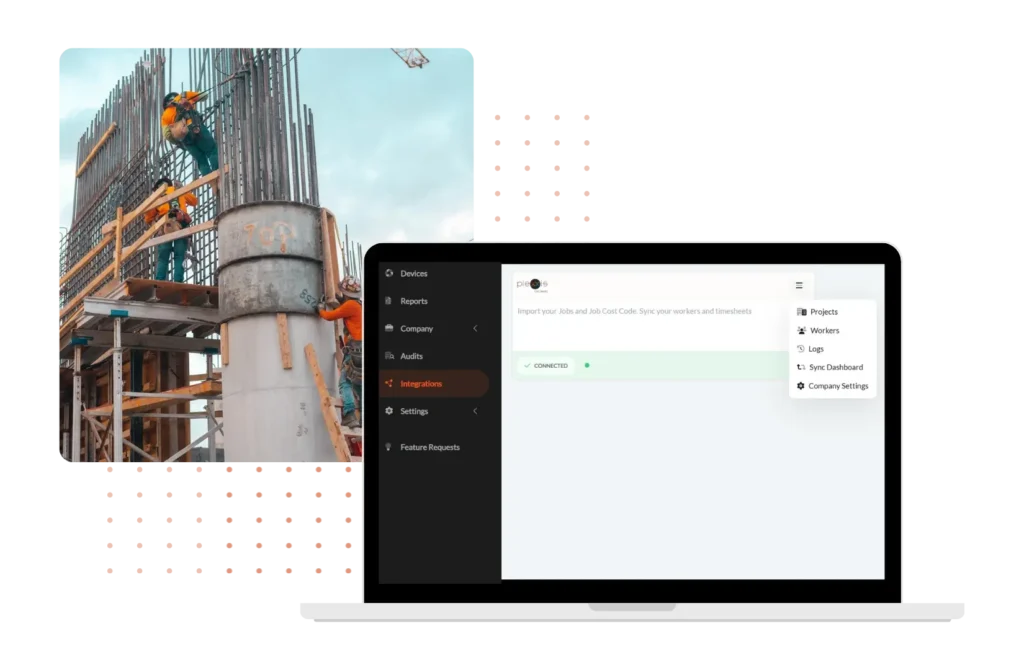
The integration moves data in two directions between SmartBarrel and Plexxis ERP. SmartBarrel pulls the records it needs to track labor, then returns verified, approved timesheets ready for payroll, whether workers clock in on the device or the mobile app.
From Plexxis into SmartBarrel:
- Employees, including the employee information Plexxis already holds
- Active jobs and their subjobs
- Activity codes, which is what Plexxis calls cost codes
From SmartBarrel into Plexxis:
- Approved timesheets matched to employee, job, activity code, date, and hours
- Entries land in Plexxis Labor Time Logs, ready for payroll processing
Because both systems draw on the same records, workers select from the real Plexxis activity code list at clock-in, not a list kept by hand. Field selections and the accounting side stay aligned, with no reconciliation step. The same data also supports daily reports, field reports, and production tracking from the jobsite.
See the Plexxis integration running on your own projects.
How Activity Codes Flow From Plexxis To The Field
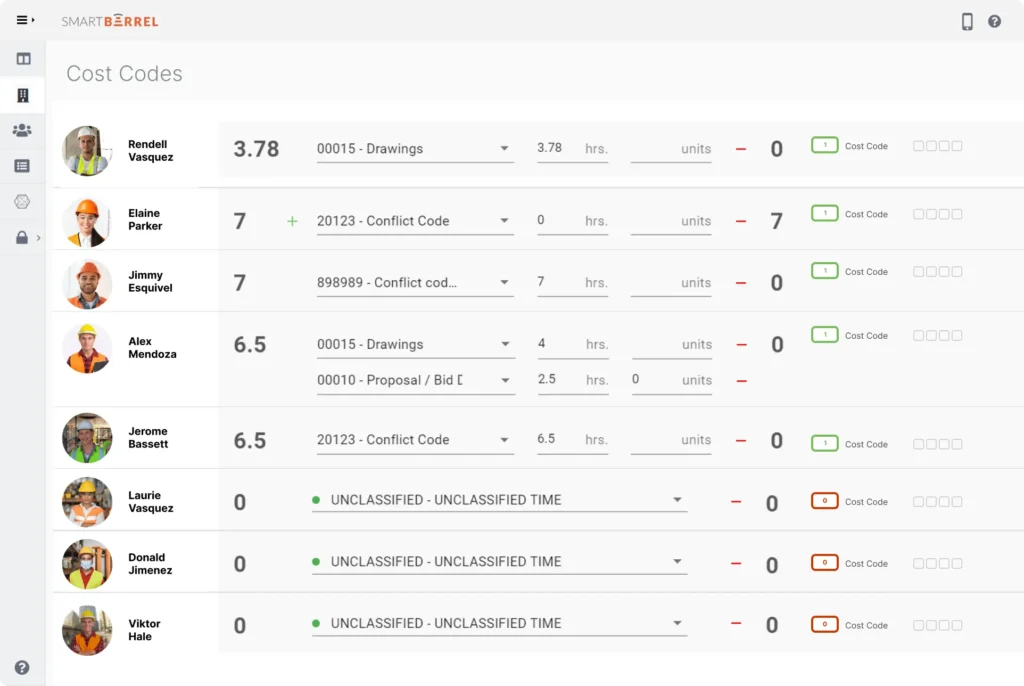
Plexxis structures activity codes in a hierarchy, and the integration preserves that structure so field selections match the ERP. Cost codes are imported in one of two formats: Subsection.ActivityCode for a standard job, or SubJob.Subsection.ActivityCode when a job is broken into subjobs.
This order is critical during setup. If a project uses subjobs, the subjob sync must complete before the cost code sync, or the codes have nothing to attach to. Once synced, they appear on the dashboard and device, so a foreman assigning time chooses from the same job cost structure the office uses in Plexxis software.
Syncing runs two ways. A manual sync updates codes on demand from the integration card, and an automatic sync keeps the list up to date on a schedule. Every sync writes to the logs, which users can download for more detail, giving payroll and finance a clear record of what moved.
In construction, the cost code is where labor turns into a number you can actually manage, and for years it's been the least reliable link in the chain. When hours get reconstructed days after the fact, the code they land on is often approximate, and that error follows the job all the way to billing. Capturing the code in the field the moment someone clocks in is what finally makes it dependable. That's a bigger shift than it sounds.
Albert Bou Fadel, CEO of SmartBarrel
How To Set Up The Plexxis Software Integration, Step By Step
Setting up the Plexxis integration takes a short sequence, and most of the setup happens once.
- Get your credentials from Plexxis: the Endpoint URL for your Plexxis CORE dataverse, your Client ID, and your Client Secret. These use OAuth 2.0; your Plexxis team can provide them.
- In the SmartBarrel dashboard, open Integrations, find the Plexxis V2 card, and connect using those credentials.
- Sync employees, active jobs, subjobs, and activity codes from Plexxis into SmartBarrel.
- Review the imported job list and activate the projects you want to track. Designate subjobs now.
- Deploy the TimeClock 4.0 at jobsite entrances, which mounts in under a minute, or run the SmartBarrel mobile app on a tablet or phone.
- Workers clock in and out on the device or the mobile app, where facial verification confirms each worker’s presence at clock-in. The check-in is user-friendly, takes three seconds, and keeps buddy punching out of the record.
- Foremen review self-populating timesheets in the dashboard or the foreman app and apply the activity codes pulled from Plexxis.
- Approved timesheets export to Plexxis Labor Time Logs, automatically on a schedule or on demand.
After setup, day-to-day is mostly review and approval. The integration handles the data movement, freeing the office from repetitive tasks and giving the team a more efficient cycle.
Foreman Entered Time vs. The Plexxis Integration
The difference between Foreman entered time and an integrated workflow shows up across the whole labor process, not only at clock-in.
Foreman entered time | SmartBarrel + Plexxis | |
Data source | Paper, memory, or after-the-fact keying | Facial verification at the jobsite |
Activity codes | Retyped by hand, easy to mismatch | Pulled from Plexxis, selected in the field |
Buddy punching | Hard to catch | Verified at every clock-in |
Payroll lead time | Days of chasing and correcting | Approved hours ready to sync |
Audit trail | Reconstructed later | Logged as it happens |
For a company moving off manual entry, the improvement shows up first in payroll processing, then in cleaner job costing once activity codes stop drifting. Real value for hourly, T&M operations.
Across the contractors I talk to, payroll is where accuracy pays off first. It's the most deadline-bound process in the business, so the week someone stops reconciling by hand, they feel it immediately. The deeper wins, fewer billing disputes and job cost reports people actually trust, show up later, once the field data has been clean for a while. The relief is fast. The confidence is what compounds.
Yana Tcharnaia, CRO at SmartBarrel
What Accurate Field Data Does For Plexxis Job Costing
Accurate field hours change what a company can trust in Plexxis job costing, because every number in Plexxis ERP depends on the labor data underneath. When hours and activity codes are verified at the source, job cost reports reflect real production, payroll runs against numbers that hold up, and change order backup rests on documented field time. The same verified data supports construction expense management and job costing across accounting, document management, reporting, and other software.
Ogden Brothers Construction offers one example. After moving to verified time tracking, the company reported eliminating roughly 1,040 hours of manual cost code correction, work that had fallen on office staff fixing field data by hand. Results vary, but cleaner input means less rework and better job costing.
For most of construction's history, job costing has been a look backward. You found out a phase ran over after it was already done, because the labor numbers behind it weren't solid until well after the fact. The real change is timing: when labor cost is dependable while the work is still happening, a contractor can act on a problem instead of just documenting it later. That turns job costing from a post-mortem into a live decision.
Albert Bou Fadel, CEO of SmartBarrel

Frequently Asked Questions
Does the Plexxis integration require a separate fee from Plexxis?
Yes. Plexxis charges its customers directly for API access, and the integration relies on that access to move data between the two systems. Contractors should confirm current pricing with their Plexxis rep before connecting.
What happens if a timesheet's activity code has not synced from Plexxis yet?
Activity codes must sync from Plexxis before timesheets can post back. If a job uses subjobs, run the subjob sync first so the codes have somewhere to attach. Approving hours after the cost code sync avoids unmatched entries.
Can the integration capture hours on jobsites without WiFi?
Yes. The TimeClock 4.0 has built-in LTE, so it records verified hours in real time without depending on site WiFi. That keeps data flowing to Plexxis software even where connectivity is unreliable.
Get The Most Accurate Time From The Field Into Plexxis
SmartBarrel lets specialty contractors and self-perform general contractors capture verified labor at the jobsite and sync it into Plexxis ERP, so payroll, job costing, and project management run on field data they can trust. For teams tired of manual entry, pairing Plexxis with dedicated construction time tracking software turns the weekly cleanup into a review-and-approve step.
Request a SmartBarrel demo, or contact the team to see the Plexxis integration on your own jobs.